Learn from the best! Meet the four finalists headed to the FINALS of the Power BI Dataviz World Championships! Register now
Hi,
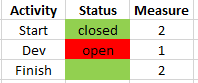
Need help with conditional formatting. I have a table with activities and statuses (closed/open). So I added this measure (called Measure) but it gives value 2 to blank cells as well:
Solved! Go to Solution.
Hi, @Anonymous
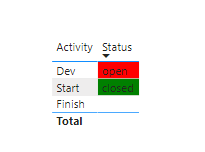
According to your description, I think you can create a measure, It only judge the two states of open and closed.
like this:
Measure = IF(MAX('Table'[Status])="open","Red",IF(MAX('Table'[Status])="closed","Green"))//Omit blank()
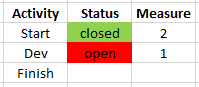
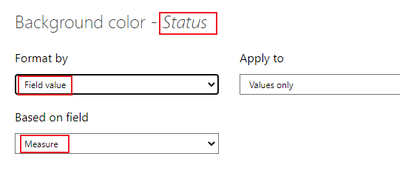
Then use it in condifitional formatting.
Like this:
Did I answer your question ? Please mark my reply as solution. Thank you very much.
If not, please feel free to ask me.
Best Regards,
Community Support Team _ Janey
Hi, @Anonymous
According to your description, I think you can create a measure, It only judge the two states of open and closed.
like this:
Measure = IF(MAX('Table'[Status])="open","Red",IF(MAX('Table'[Status])="closed","Green"))//Omit blank()
Then use it in condifitional formatting.
Like this:
Did I answer your question ? Please mark my reply as solution. Thank you very much.
If not, please feel free to ask me.
Best Regards,
Community Support Team _ Janey
@Anonymous , Blank cell can not be colored
Try this
color measure =
var _1 = coalesce(MAX([Table]), "Closed")
return
SWITCH(_1,
"Closed","Green"
"Open","Red"
)
Use this in conditional formatting using field value option
)
@amitchandak, thanks! but I need this measure as an input in conditional formatting for background color of cells thus the values 1 and 2. And with your modification I can not choose the measure in conditional formatting anymore.
| User | Count |
|---|---|
| 58 | |
| 45 | |
| 32 | |
| 16 | |
| 14 |
| User | Count |
|---|---|
| 82 | |
| 66 | |
| 42 | |
| 27 | |
| 25 |