This time we’re going bigger than ever. Fabric, Power BI, SQL, AI and more. We're covering it all. You won't want to miss it.
Learn moreLevel up your Power BI skills this month - build one visual each week and tell better stories with data! Get started
Hi,
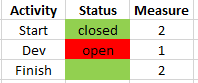
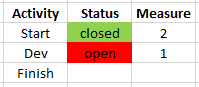
Need help with conditional formatting. I have a table with activities and statuses (closed/open). So I added this measure (called Measure) but it gives value 2 to blank cells as well:
Solved! Go to Solution.
Hi, @Anonymous
According to your description, I think you can create a measure, It only judge the two states of open and closed.
like this:
Measure = IF(MAX('Table'[Status])="open","Red",IF(MAX('Table'[Status])="closed","Green"))//Omit blank()
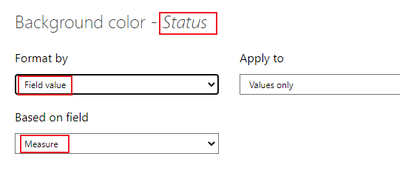
Then use it in condifitional formatting.
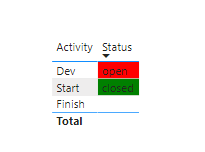
Like this:
Did I answer your question ? Please mark my reply as solution. Thank you very much.
If not, please feel free to ask me.
Best Regards,
Community Support Team _ Janey
Hi, @Anonymous
According to your description, I think you can create a measure, It only judge the two states of open and closed.
like this:
Measure = IF(MAX('Table'[Status])="open","Red",IF(MAX('Table'[Status])="closed","Green"))//Omit blank()
Then use it in condifitional formatting.
Like this:
Did I answer your question ? Please mark my reply as solution. Thank you very much.
If not, please feel free to ask me.
Best Regards,
Community Support Team _ Janey
@Anonymous , Blank cell can not be colored
Try this
color measure =
var _1 = coalesce(MAX([Table]), "Closed")
return
SWITCH(_1,
"Closed","Green"
"Open","Red"
)
Use this in conditional formatting using field value option
)
@amitchandak, thanks! but I need this measure as an input in conditional formatting for background color of cells thus the values 1 and 2. And with your modification I can not choose the measure in conditional formatting anymore.
Check out the April 2026 Power BI update to learn about new features.
Sign up to receive a private message when registration opens and key events begin.
If you have recently started exploring Fabric, we'd love to hear how it's going. Your feedback can help with product improvements.
| User | Count |
|---|---|
| 37 | |
| 32 | |
| 27 | |
| 24 | |
| 17 |
| User | Count |
|---|---|
| 70 | |
| 50 | |
| 31 | |
| 26 | |
| 22 |