
cancel
Showing results for 
Search instead for 
Did you mean: 

July 7 - July 17 | Round 2 of the Power BI Dataviz World Championships. Don't miss your chance! Learn more

Reply
Anonymous
Not applicable

Conditional formatting background_empty cells

Hi,

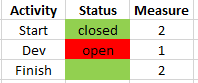
Need help with conditional formatting. I have a table with activities and statuses (closed/open). So I added this measure (called Measure) but it gives value 2 to blank cells as well:


Measure =
SWITCH(MAX([Table]),
"Closed",2,
"Open",1
)
 
                                                                                                   Now
1.PNG
 
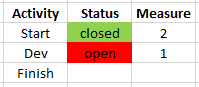
So how do I change the Measure so that it leaves blank cells without value and they thefore not colored at all:       
                                                                                                     To be
Capture.PNG
1 ACCEPTED SOLUTION
v-janeyg-msft
Community Support
Community Support

Hi, @Anonymous 


According to your description, I think you can create a measure, It only judge the two states of open and closed.

like this:

Measure = IF(MAX('Table'[Status])="open","Red",IF(MAX('Table'[Status])="closed","Green"))//Omit blank()

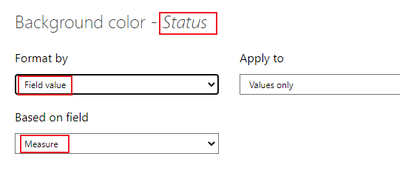
Then use it in condifitional formatting.

Like this:

vjaneygmsft_0-1631167827498.png

vjaneygmsft_1-1631167836678.png


Did I answer your question ? Please mark my reply as solution. Thank you very much.
If not, please feel free to ask me.


Best Regards,

Community Support Team _ Janey

View solution in original post

3 REPLIES 3
v-janeyg-msft
Community Support
Community Support

Hi, @Anonymous 


According to your description, I think you can create a measure, It only judge the two states of open and closed.

like this:

Measure = IF(MAX('Table'[Status])="open","Red",IF(MAX('Table'[Status])="closed","Green"))//Omit blank()

Then use it in condifitional formatting.

Like this:

vjaneygmsft_0-1631167827498.png

vjaneygmsft_1-1631167836678.png


Did I answer your question ? Please mark my reply as solution. Thank you very much.
If not, please feel free to ask me.


Best Regards,

Community Support Team _ Janey

amitchandak
Super User
Super User

@Anonymous , Blank cell can not be colored


Try this

color measure =

var _1 = coalesce(MAX([Table]), "Closed")

return

SWITCH(_1,
"Closed","Green"
"Open","Red"

)


Use this in conditional formatting using field value option
)

Share with Power BI Enthusiasts: Full Power BI Video (20 Hours) YouTube
Microsoft Fabric Series 60+ Videos YouTube
Microsoft Fabric Hindi End to End YouTube
Anonymous
Not applicable

@amitchandak, thanks! but I need this measure as an input in conditional formatting for background color of cells thus the values 1 and 2. And with your modification I can not choose the measure in conditional formatting anymore.

Helpful resources

Announcements
FabCon and SQLCon Barcelona 2026

FabCon & SQLCon – Barcelona 2026

Join us in Barcelona for FabCon and SQLCon, the Fabric, Power BI, SQL, and AI community event. Save €200 with code FABCMTY200.

60 days of Data Days Carousel

Data Days 2026

Join Data Days 2026: 60 days of free live/on-demand sessions, challenges, study groups, and certification opportunities.

Power BI DataViz World Championships carousel

Power BI DataViz World Championships - June 2026

A new Power BI DataViz World Championship is coming this June! Don't miss out on submitting your entry.

Top Solution Authors