cancel
Showing results for 
Search instead for 
Did you mean: 

Join the FabCon + SQLCon recap series. Up next: Power BI, Real-Time Intelligence, IQ and AI, and Data Factory take center stage. All sessions are available on-demand after the live show. Register now

Reply
Masikonde
Frequent Visitor

Conditional Formatting using color dots

Hello Everyone,


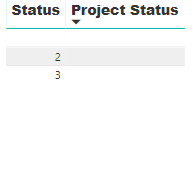
I'm trying to use conditional formating on the table attached to return a "black dot for blank status", "orange dot for number 2 on the status column" and "green dot for number 3 of status column" These dots "Icons"dots.PNG should be on the on the "Project Status Column". 

Status.PNG


1 ACCEPTED SOLUTION
Masikonde
Frequent Visitor

When I follow the process on your article, it's only able to recognise the the blank space. The picture shows how I'm setting the conditions, is there a step I'm missing?Form.PNG


View solution in original post

4 REPLIES 4
Masikonde
Frequent Visitor

When I follow the process on your article, it's only able to recognise the the blank space. The picture shows how I'm setting the conditions, is there a step I'm missing?Form.PNG


j

Greg_Deckler
Community Champion
Community Champion

Better ways of doing it now, like @MattAllington 's post, but wrote some SVG stuff for this quite a while ago:

https://community.powerbi.com/t5/Quick-Measures-Gallery/SVG-Multi-Shape-Multi-Color-Indicators/td-p/...


Follow on LinkedIn
@ me in replies or I'll lose your thread!!!
Instead of a Kudo, please vote for this idea
Become an expert!: Enterprise DNA
External Tools: MSHGQM
YouTube Channel!: Microsoft Hates Greg
Latest book!:
DAX For Humans

DAX is easy, CALCULATE makes DAX hard...
MattAllington
Community Champion
Community Champion

I wrote this article here that should help you. https://exceleratorbi.com.au/conditional-formatting-using-icons-in-power-bi/


Best practice is to not use coloured dots that may cause issues with colour blindness. 


* Matt is an 8 times Microsoft MVP (Power BI) and author of the Power BI Book Supercharge Power BI.
I will not give you bad advice, even if you unknowingly ask for it.

Helpful resources

Announcements
April Power BI Update Carousel

Power BI Monthly Update - April 2026

Check out the April 2026 Power BI update to learn about new features.

New to Fabric survey Carousel

New to Fabric Survey

If you have recently started exploring Fabric, we'd love to hear how it's going. Your feedback can help with product improvements.

Power BI DataViz World Championships carousel

Power BI DataViz World Championships - June 2026

A new Power BI DataViz World Championship is coming this June! Don't miss out on submitting your entry.

FabCon and SQLCon Highlights Carousel

FabCon &SQLCon Highlights

Experience the highlights from FabCon & SQLCon, available live and on-demand starting April 14th.