Join us at FabCon Atlanta from March 16 - 20, 2026, for the ultimate Fabric, Power BI, AI and SQL community-led event. Save $200 with code FABCOMM.
Register now!Vote for your favorite vizzies from the Power BI Dataviz World Championship submissions. Vote now!
Hello Everyone,
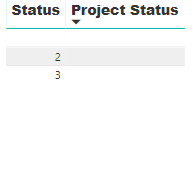
I'm trying to use conditional formating on the table attached to return a "black dot for blank status", "orange dot for number 2 on the status column" and "green dot for number 3 of status column" These dots "Icons" should be on the on the "Project Status Column".
Solved! Go to Solution.
When I follow the process on your article, it's only able to recognise the the blank space. The picture shows how I'm setting the conditions, is there a step I'm missing?
j
Better ways of doing it now, like @MattAllington 's post, but wrote some SVG stuff for this quite a while ago:
I wrote this article here that should help you. https://exceleratorbi.com.au/conditional-formatting-using-icons-in-power-bi/
Best practice is to not use coloured dots that may cause issues with colour blindness.
Vote for your favorite vizzies from the Power BI World Championship submissions!
If you love stickers, then you will definitely want to check out our Community Sticker Challenge!
Check out the January 2026 Power BI update to learn about new features.
| User | Count |
|---|---|
| 64 | |
| 51 | |
| 46 | |
| 23 | |
| 19 |
| User | Count |
|---|---|
| 136 | |
| 110 | |
| 50 | |
| 32 | |
| 29 |