This is best Fabric, Power BI, SQL and AI community event. How do we know? The last event sold out! Save €200 with code FABCMTY200.
Register nowJuly 28 - August 9 | Final Round of the Power BI Dataviz World Championships. This is your chance. Learn more
Hello Everyone,
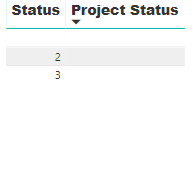
I'm trying to use conditional formating on the table attached to return a "black dot for blank status", "orange dot for number 2 on the status column" and "green dot for number 3 of status column" These dots "Icons" should be on the on the "Project Status Column".
Solved! Go to Solution.
When I follow the process on your article, it's only able to recognise the the blank space. The picture shows how I'm setting the conditions, is there a step I'm missing?
j
Better ways of doing it now, like @MattAllington 's post, but wrote some SVG stuff for this quite a while ago:
I wrote this article here that should help you. https://exceleratorbi.com.au/conditional-formatting-using-icons-in-power-bi/
Best practice is to not use coloured dots that may cause issues with colour blindness.
Join us in Barcelona for FabCon and SQLCon, the Fabric, Power BI, SQL, and AI community event. Save €200 with code FABCMTY200.
If you love stickers, then you will definitely want to check out our community sticker challenge, Barcelona edition!
Check out the July 2026 Power BI update to learn about new features.
| User | Count |
|---|---|
| 25 | |
| 23 | |
| 20 | |
| 18 | |
| 14 |
| User | Count |
|---|---|
| 24 | |
| 20 | |
| 20 | |
| 19 | |
| 19 |