cancel
Showing results for 
Search instead for 
Did you mean: 

July 28 - August 9 | Final Round of the Power BI Dataviz World Championships. This is your chance. Learn more

Reply
swwong1
Helper III
Helper III

Conditional Formatting on Matrix Row

Hi All,


Just wondering if it's possible to conditional format based on another value (not part of the matrix).


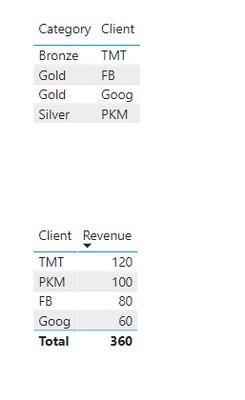
Referring to the first table, each client has a particular category based on spending. I would like to present the second table where it only shows the Client Name and Revenue. However, I would like the set the entire row to be a specific colour depending on the category (but I don't want to show category as a column, just by the colour of the row)

swwong1_0-1625577360364.png

https://www.dropbox.com/s/0kpat5vnkzvbzpg/PBI%20File.pbix?dl=0 


Many thanks


1 ACCEPTED SOLUTION

Thanks, I probably chose the wrong example as Gold/Silver/Bronze is a category rather than the colour I want.


After some research, it seems like you can't set colours based on specific text (by default) - as in Gold category should be in blue font. Instead, I have created a measure through SWITCH and set up a rule under conditional formatting.


If anyone is interested, I have updated it on my PBI file in the link.

View solution in original post

2 REPLIES 2
tdaniel
Frequent Visitor

Hey, 

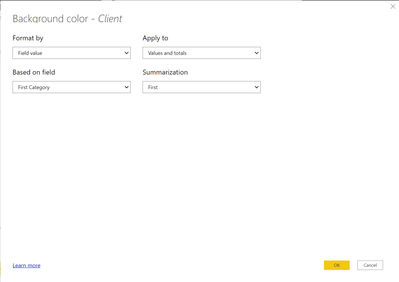
So If you select the Matrix and then go into the "Format" section and go to the "Conditional Formatting" dropdown make sure "Client" is seleted and then turn on "Backgroud Color" and then set the fields to the Screenshot below. This should work and set the Client names to their Category.


tdaniel_0-1625578425937.png


Thanks, I probably chose the wrong example as Gold/Silver/Bronze is a category rather than the colour I want.


After some research, it seems like you can't set colours based on specific text (by default) - as in Gold category should be in blue font. Instead, I have created a measure through SWITCH and set up a rule under conditional formatting.


If anyone is interested, I have updated it on my PBI file in the link.

Helpful resources

Announcements
Fabric Community Sticker Design Challenge Barcelona Carousel

Fabric Community Sticker Challenge - Barcelona 2026

If you love stickers, then you will definitely want to check out our community sticker challenge, Barcelona edition!

July Power BI Update Carousel

Power BI Monthly Update - July 2026

Check out the July 2026 Power BI update to learn about new features.

Power BI DataViz World Championships carousel

Power BI DataViz World Championships - June 2026

A new Power BI DataViz World Championship is coming this June! Don't miss out on submitting your entry.

Top Solution Authors