This is best Fabric, Power BI, SQL and AI community event. How do we know? The last event sold out! Save €200 with code FABCMTY200.
Register nowA new Data Days event is coming soon! This time we’re going bigger than ever. Fabric, Power BI, SQL, AI and more. Don't miss out.
Hi All,
Just wondering if it's possible to conditional format based on another value (not part of the matrix).
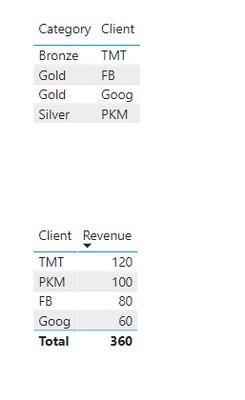
Referring to the first table, each client has a particular category based on spending. I would like to present the second table where it only shows the Client Name and Revenue. However, I would like the set the entire row to be a specific colour depending on the category (but I don't want to show category as a column, just by the colour of the row)
https://www.dropbox.com/s/0kpat5vnkzvbzpg/PBI%20File.pbix?dl=0
Many thanks
Solved! Go to Solution.
Thanks, I probably chose the wrong example as Gold/Silver/Bronze is a category rather than the colour I want.
After some research, it seems like you can't set colours based on specific text (by default) - as in Gold category should be in blue font. Instead, I have created a measure through SWITCH and set up a rule under conditional formatting.
If anyone is interested, I have updated it on my PBI file in the link.
Hey,
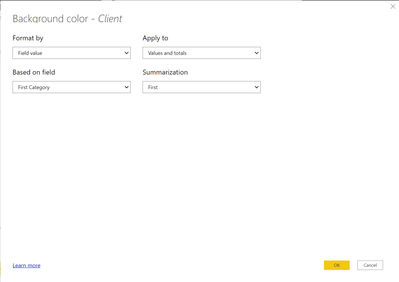
So If you select the Matrix and then go into the "Format" section and go to the "Conditional Formatting" dropdown make sure "Client" is seleted and then turn on "Backgroud Color" and then set the fields to the Screenshot below. This should work and set the Client names to their Category.
Thanks, I probably chose the wrong example as Gold/Silver/Bronze is a category rather than the colour I want.
After some research, it seems like you can't set colours based on specific text (by default) - as in Gold category should be in blue font. Instead, I have created a measure through SWITCH and set up a rule under conditional formatting.
If anyone is interested, I have updated it on my PBI file in the link.
Sign up to receive a private message when registration opens and key events begin.
If you have recently started exploring Fabric, we'd love to hear how it's going. Your feedback can help with product improvements.
| User | Count |
|---|---|
| 32 | |
| 26 | |
| 23 | |
| 20 | |
| 15 |
| User | Count |
|---|---|
| 64 | |
| 41 | |
| 28 | |
| 22 | |
| 22 |