cancel
Showing results for 
Search instead for 
Did you mean: 

The Power BI Data Visualization World Championships is back! Get ahead of the game and start preparing now! Learn more

Reply
swwong1
Helper III
Helper III

Conditional Formatting on Matrix Row

Hi All,


Just wondering if it's possible to conditional format based on another value (not part of the matrix).


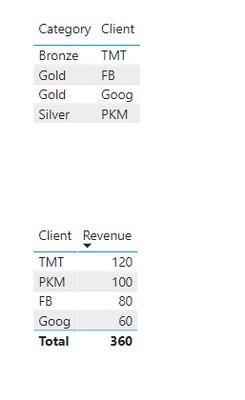
Referring to the first table, each client has a particular category based on spending. I would like to present the second table where it only shows the Client Name and Revenue. However, I would like the set the entire row to be a specific colour depending on the category (but I don't want to show category as a column, just by the colour of the row)

swwong1_0-1625577360364.png

https://www.dropbox.com/s/0kpat5vnkzvbzpg/PBI%20File.pbix?dl=0 


Many thanks


1 ACCEPTED SOLUTION

Thanks, I probably chose the wrong example as Gold/Silver/Bronze is a category rather than the colour I want.


After some research, it seems like you can't set colours based on specific text (by default) - as in Gold category should be in blue font. Instead, I have created a measure through SWITCH and set up a rule under conditional formatting.


If anyone is interested, I have updated it on my PBI file in the link.

View solution in original post

2 REPLIES 2
tdaniel
Frequent Visitor

Hey, 

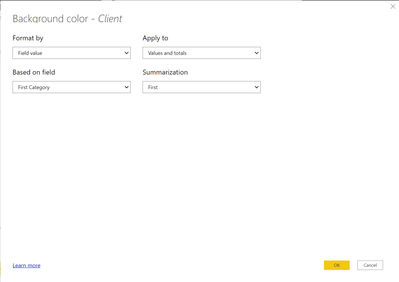
So If you select the Matrix and then go into the "Format" section and go to the "Conditional Formatting" dropdown make sure "Client" is seleted and then turn on "Backgroud Color" and then set the fields to the Screenshot below. This should work and set the Client names to their Category.


tdaniel_0-1625578425937.png


Thanks, I probably chose the wrong example as Gold/Silver/Bronze is a category rather than the colour I want.


After some research, it seems like you can't set colours based on specific text (by default) - as in Gold category should be in blue font. Instead, I have created a measure through SWITCH and set up a rule under conditional formatting.


If anyone is interested, I have updated it on my PBI file in the link.

Helpful resources

Announcements
Power BI DataViz World Championships

Power BI Dataviz World Championships

The Power BI Data Visualization World Championships is back! Get ahead of the game and start preparing now!

December 2025 Power BI Update Carousel

Power BI Monthly Update - December 2025

Check out the December 2025 Power BI Holiday Recap!

FabCon Atlanta 2026 carousel

FabCon Atlanta 2026

Join us at FabCon Atlanta, March 16-20, for the ultimate Fabric, Power BI, AI and SQL community-led event. Save $200 with code FABCOMM.