
cancel
Showing results for 
Search instead for 
Did you mean: 

The Power BI Data Visualization World Championships is back! Get ahead of the game and start preparing now! Learn more

Reply
wkeicher
Helper III
Helper III

Conditional Formatting based on Matrix Columns

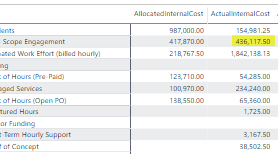
Hi I am trying to format columns where the value of column 2 is greater than the value in Coumn 1 in a Matrix Visual.CondFormat.png

1 ACCEPTED SOLUTION
JIGAR
Resolver IV
Resolver IV

@wkeicher 


You can create a measure something like this


ColorFormat = SWITCH(
TRUE()
,SUM(Test2[Column2]) > SUM(Test2[Column1]), "#f44242","#F2C80F")
 
Column2 = ActualInternalCost, Column 1 = AllocatedInternalCost in your case.
 
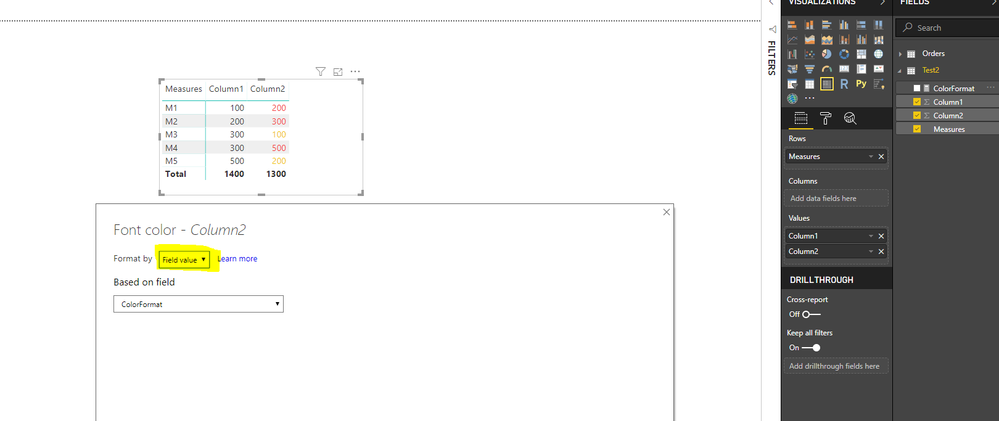
After creating this measure, create a matrix using your columns. On ActualInternalCost set the conditional formatting for font colors/background color. 
 
On conditional formatting pop up, select Field Value in the Format By dropdown. 
Select the measure you created earlier in the Based on Field dropdown. You should be able to see the conditional formatting. Please see the screenshot below
 
Capture.PNG
 
Hope this helps !! Please mark the answer as accepted solution if you find it appropriate..
 
Thanks

View solution in original post

3 REPLIES 3
JIGAR
Resolver IV
Resolver IV

@wkeicher 


You can create a measure something like this


ColorFormat = SWITCH(
TRUE()
,SUM(Test2[Column2]) > SUM(Test2[Column1]), "#f44242","#F2C80F")
 
Column2 = ActualInternalCost, Column 1 = AllocatedInternalCost in your case.
 
After creating this measure, create a matrix using your columns. On ActualInternalCost set the conditional formatting for font colors/background color. 
 
On conditional formatting pop up, select Field Value in the Format By dropdown. 
Select the measure you created earlier in the Based on Field dropdown. You should be able to see the conditional formatting. Please see the screenshot below
 
Capture.PNG
 
Hope this helps !! Please mark the answer as accepted solution if you find it appropriate..
 
Thanks

Small Issue - When I apply the formatting to the following - I do not get the desired result. It works for all other feilds. I suspect it has to do with not being able to Sum(Total_Actual_Cost) because it is already a Measure. Is there a work around?meas.png

@wkeicher 


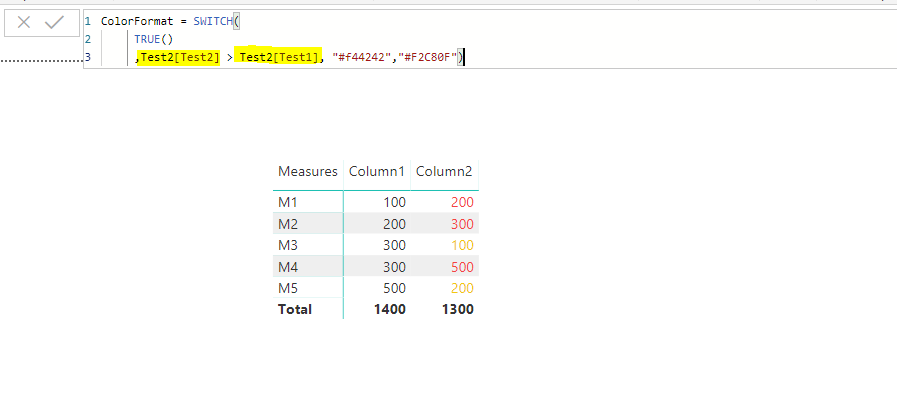
I believe if you use columns on both the sides of (>) sign or measures on both the sides of (>) sign you should see the desired result. Please see the screenshot.

Capture.PNG

I can see you are using column on end side and measure on the other. 


Hope that helps !!

Helpful resources

Announcements
Power BI DataViz World Championships

Power BI Dataviz World Championships

The Power BI Data Visualization World Championships is back! Get ahead of the game and start preparing now!

December 2025 Power BI Update Carousel

Power BI Monthly Update - December 2025

Check out the December 2025 Power BI Holiday Recap!

FabCon Atlanta 2026 carousel

FabCon Atlanta 2026

Join us at FabCon Atlanta, March 16-20, for the ultimate Fabric, Power BI, AI and SQL community-led event. Save $200 with code FABCOMM.

Top Solution Authors