
Join us at FabCon Atlanta from March 16 - 20, 2026, for the ultimate Fabric, Power BI, AI and SQL community-led event. Save $200 with code FABCOMM.
Register now!Vote for your favorite vizzies from the Power BI Dataviz World Championship submissions. Vote now!
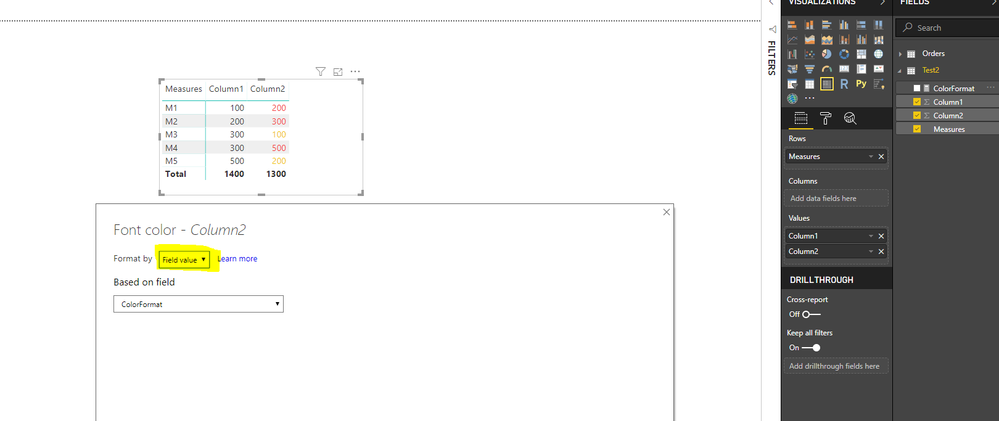
Hi I am trying to format columns where the value of column 2 is greater than the value in Coumn 1 in a Matrix Visual.
Solved! Go to Solution.
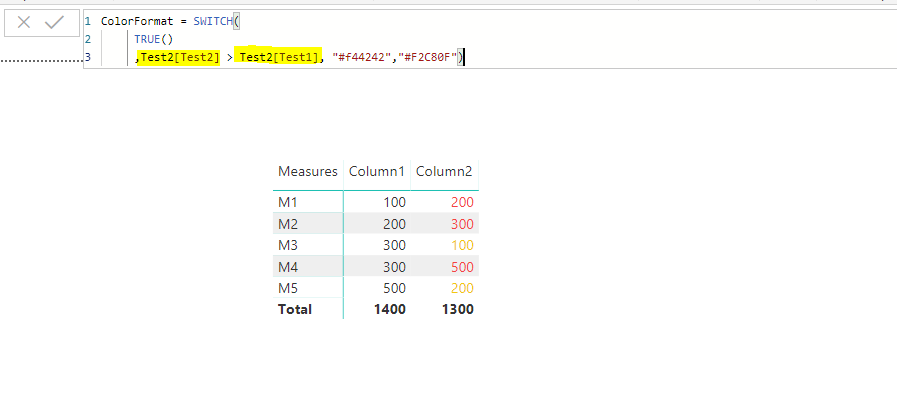
You can create a measure something like this
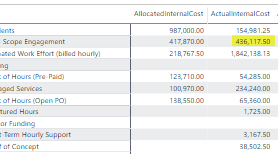
Small Issue - When I apply the formatting to the following - I do not get the desired result. It works for all other feilds. I suspect it has to do with not being able to Sum(Total_Actual_Cost) because it is already a Measure. Is there a work around?
I believe if you use columns on both the sides of (>) sign or measures on both the sides of (>) sign you should see the desired result. Please see the screenshot.
I can see you are using column on end side and measure on the other.
Hope that helps !!
Vote for your favorite vizzies from the Power BI World Championship submissions!
If you love stickers, then you will definitely want to check out our Community Sticker Challenge!
Check out the January 2026 Power BI update to learn about new features.
| User | Count |
|---|---|
| 65 | |
| 51 | |
| 42 | |
| 23 | |
| 21 |
| User | Count |
|---|---|
| 139 | |
| 116 | |
| 53 | |
| 37 | |
| 31 |