
Join us at FabCon Atlanta from March 16 - 20, 2026, for the ultimate Fabric, Power BI, AI and SQL community-led event. Save $200 with code FABCOMM.
Register now!The Power BI Data Visualization World Championships is back! It's time to submit your entry. Live now!
Hi I am trying to format columns where the value of column 2 is greater than the value in Coumn 1 in a Matrix Visual.
Solved! Go to Solution.
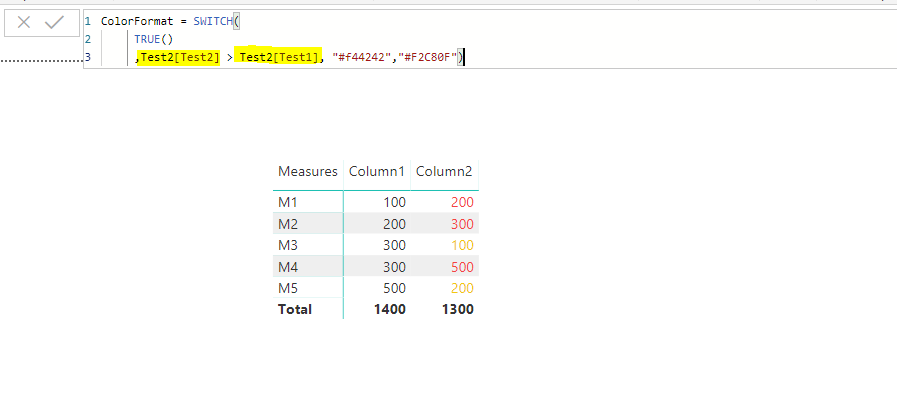
You can create a measure something like this
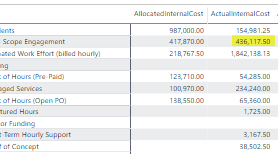
Small Issue - When I apply the formatting to the following - I do not get the desired result. It works for all other feilds. I suspect it has to do with not being able to Sum(Total_Actual_Cost) because it is already a Measure. Is there a work around?
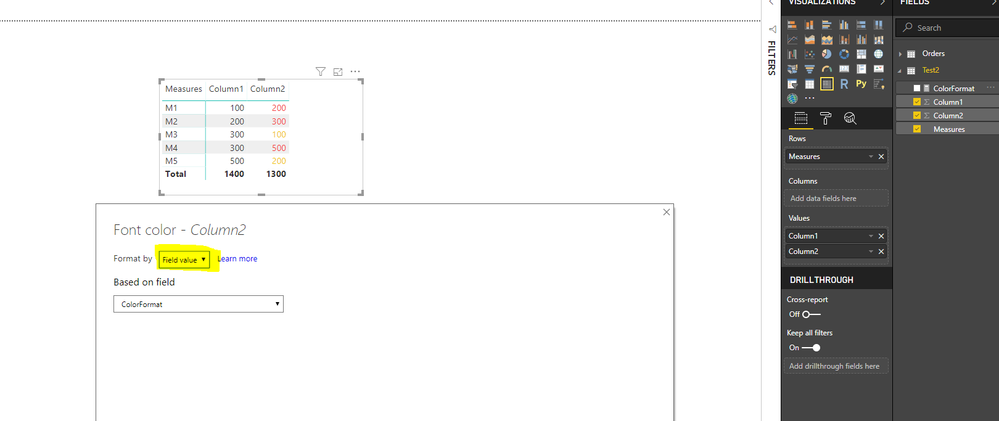
I believe if you use columns on both the sides of (>) sign or measures on both the sides of (>) sign you should see the desired result. Please see the screenshot.
I can see you are using column on end side and measure on the other.
Hope that helps !!
| User | Count |
|---|---|
| 53 | |
| 40 | |
| 35 | |
| 24 | |
| 22 |
| User | Count |
|---|---|
| 135 | |
| 111 | |
| 57 | |
| 44 | |
| 38 |