Get certified for free when you join Fabric Data Days 2026 and dive into Fabric, Power BI, SQL, AI, and other essential data skills.
Join nowData Days is here! Join us now for 60+ days of learning, challenges, and connection. Learn more
Is there a way to format table rows so that say if the row had "Closed" in the "Office Status" column, the row is "Red", but if the Office Status" is "Open", then then the row is green?
Solved! Go to Solution.
Office_Status_Custom_Column = IF(Sheet1[Office Status] = "Closed", 0, IF(Sheet1[Office Status] = "Open", 1, 2))
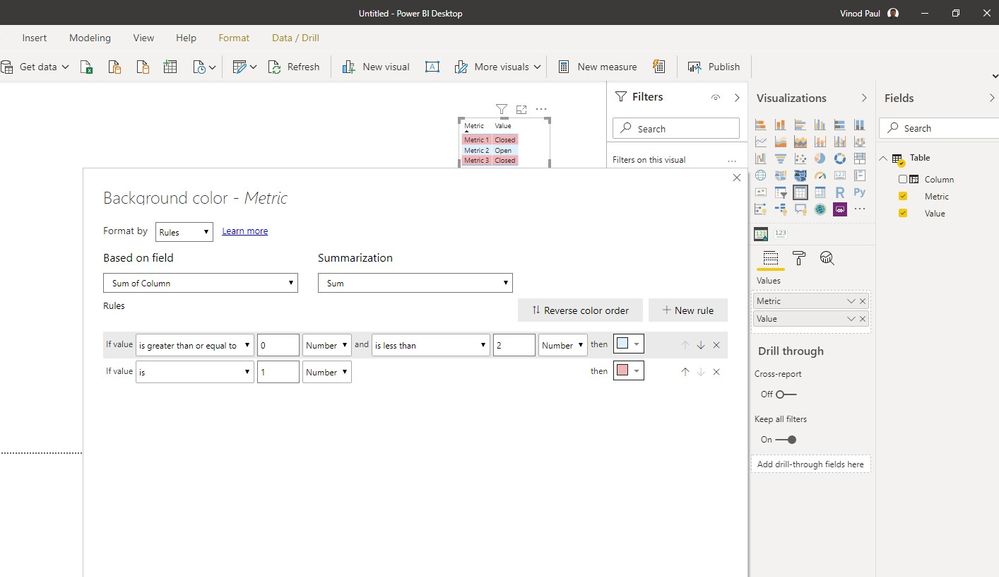
Create a custom column to mark the open status as 1 and closed as 0.
Then apply conditional formatting based on rules to set the background color for each of the cols based on the value in the new column
Thanks, not overly familiar with custom columns, so struggling with the code.
Guess it would be something like
Office_Status_Custom_Column = IF(Sheet1[Office Status] = "Closed"), "0"), IF(Sheet1[Office Status] = "Open"), "1"), IF(Sheet1[Office Status] = "Other"), "2")
But cant figure it out, any guidence would be great.
Office_Status_Custom_Column = IF(Sheet1[Office Status] = "Closed", 0, IF(Sheet1[Office Status] = "Open", 1, 2))
Thanks 👍
Don't miss out on Data Days, June 15 through August 7. Learn Fabric, Power BI, SQL, AI and more.
Check out the May 2026 Power BI update to learn about new features.
| User | Count |
|---|---|
| 23 | |
| 23 | |
| 20 | |
| 18 | |
| 14 |
| User | Count |
|---|---|
| 58 | |
| 53 | |
| 42 | |
| 30 | |
| 24 |