We've captured the moments from FabCon & SQLCon that everyone is talking about, and we are bringing them to the community, live and on-demand. Starts on April 14th. Register now
Is there a way to format table rows so that say if the row had "Closed" in the "Office Status" column, the row is "Red", but if the Office Status" is "Open", then then the row is green?
Solved! Go to Solution.
Office_Status_Custom_Column = IF(Sheet1[Office Status] = "Closed", 0, IF(Sheet1[Office Status] = "Open", 1, 2))
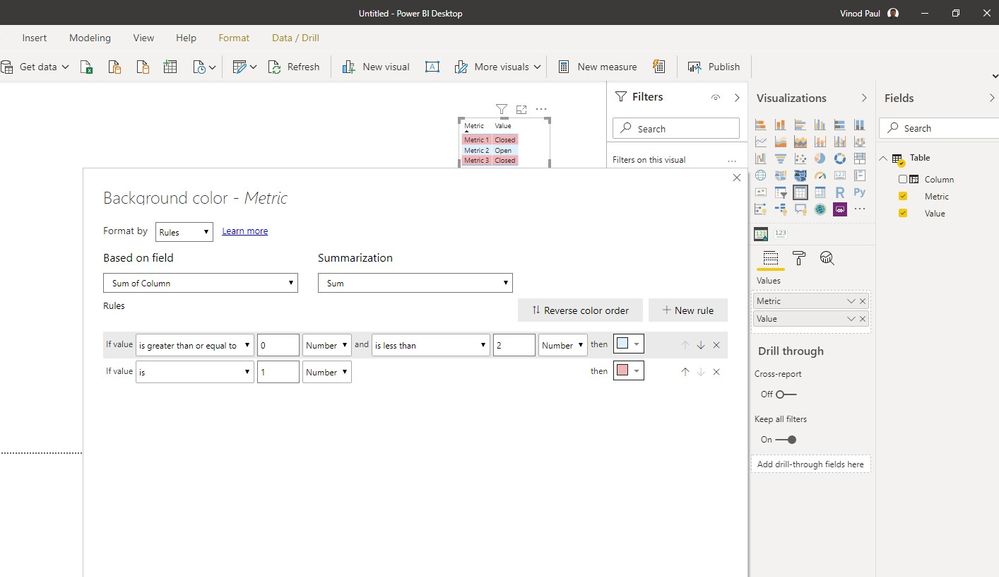
Create a custom column to mark the open status as 1 and closed as 0.
Then apply conditional formatting based on rules to set the background color for each of the cols based on the value in the new column
Thanks, not overly familiar with custom columns, so struggling with the code.
Guess it would be something like
Office_Status_Custom_Column = IF(Sheet1[Office Status] = "Closed"), "0"), IF(Sheet1[Office Status] = "Open"), "1"), IF(Sheet1[Office Status] = "Other"), "2")
But cant figure it out, any guidence would be great.
Office_Status_Custom_Column = IF(Sheet1[Office Status] = "Closed", 0, IF(Sheet1[Office Status] = "Open", 1, 2))
Thanks 👍
If you have recently started exploring Fabric, we'd love to hear how it's going. Your feedback can help with product improvements.
A new Power BI DataViz World Championship is coming this June! Don't miss out on submitting your entry.
Share feedback directly with Fabric product managers, participate in targeted research studies and influence the Fabric roadmap.
| User | Count |
|---|---|
| 53 | |
| 38 | |
| 33 | |
| 17 | |
| 17 |
| User | Count |
|---|---|
| 67 | |
| 62 | |
| 38 | |
| 34 | |
| 22 |