cancel
Showing results for 
Search instead for 
Did you mean: 

July 7 - July 17 | Round 2 of the Power BI Dataviz World Championships. Don't miss your chance! Learn more

Reply
StuartSmith
Power Participant
Power Participant

Conditional Formatting Table Row Colour\Color

Is there a way to format table rows so that say if the row had "Closed" in the "Office Status" column, the row is "Red", but if the Office Status" is "Open", then then the row is green?

1 ACCEPTED SOLUTION

Office_Status_Custom_Column = IF(Sheet1[Office Status] = "Closed", 0, IF(Sheet1[Office Status] = "Open", 1, 2))

View solution in original post

4 REPLIES 4
luapdoniv
Resolver II
Resolver II

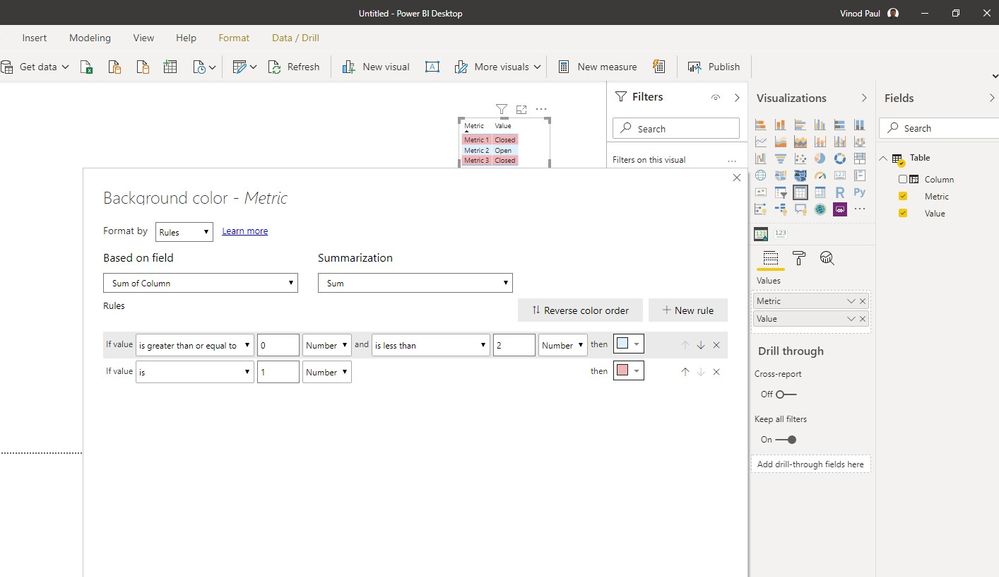
Create a custom column to mark the open status as 1 and closed as 0.
Then apply conditional formatting based on rules to set the background color for each of the cols based on the value in the new columnScreenshot_2.jpg

Thanks, not overly familiar with custom columns, so struggling with the code.


Guess it would be something like


Office_Status_Custom_Column = IF(Sheet1[Office Status] = "Closed"), "0"), IF(Sheet1[Office Status] = "Open"), "1"), IF(Sheet1[Office Status] = "Other"), "2")


But cant figure it out, any guidence would be great.


Office_Status_Custom_Column = IF(Sheet1[Office Status] = "Closed", 0, IF(Sheet1[Office Status] = "Open", 1, 2))

Thanks 👍

Helpful resources

Announcements
FabCon and SQLCon Barcelona 2026

FabCon & SQLCon – Barcelona 2026

Join us in Barcelona for FabCon and SQLCon, the Fabric, Power BI, SQL, and AI community event. Save €200 with code FABCMTY200.

60 days of Data Days Carousel

Data Days 2026

Join Data Days 2026: 60 days of free live/on-demand sessions, challenges, study groups, and certification opportunities.

Power BI DataViz World Championships carousel

Power BI DataViz World Championships - June 2026

A new Power BI DataViz World Championship is coming this June! Don't miss out on submitting your entry.

Top Solution Authors
Top Kudoed Authors