cancel
Showing results for 
Search instead for 
Did you mean: 

July 7 - July 17 | Round 2 of the Power BI Dataviz World Championships. Don't miss your chance! Learn more

Reply
Anonymous
Not applicable

Conditional Formatting Matrix Top Level

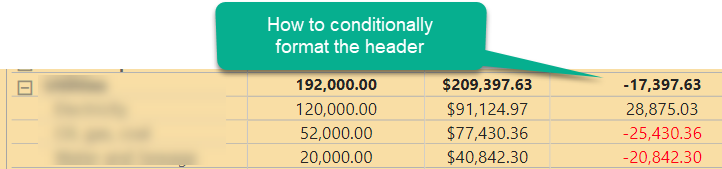
How do I conditionally format the top level. It's properly formatting negatives when I open up the row, but the top level row itself is not formatting. 

powerbimatrixquestion.png

1 ACCEPTED SOLUTION
Anonymous
Not applicable

Click the Apply to dropdown in the conditional formatting advanced controls dialog and choose Values and Totals.

https://powerbi.microsoft.com/en-us/blog/power-bi-desktop-april-2020-feature-summary/#_Conditional_f...

HTH,

Smitty

View solution in original post

3 REPLIES 3
collinq
Super User
Super User

Hi @Anonymous ,


To clarify from your screenshot, you are not trying to format the header but rather the top line/total line for that level of the Matrix.  To format that all you do is select the field from the values drop down in the visualizations pane and then select conditional formatting.


If you really are trying to format a Header, then the Matrix visual gives you a few options.  You can select that field itself on the Fields list and change the way it looks, or you can select the Format option in the Visualizations for that visual and modify the "Column Headers" or the "Field Formatting"  or the Conditional Formatting" for that field.


I would appreciate Kudos if my response was helpful. I would also appreciate it if you would Mark this As a Solution if it solved the problem. Thanks!


Did I answer your question? Mark my post as a solution!

Proud to be a Datanaut!
Private message me for consulting or training needs.


Anonymous
Not applicable

Thank you Smitty! I have applied to both values and totals and it's working. Much thanks and respect to your name.


zach 

Anonymous
Not applicable

Click the Apply to dropdown in the conditional formatting advanced controls dialog and choose Values and Totals.

https://powerbi.microsoft.com/en-us/blog/power-bi-desktop-april-2020-feature-summary/#_Conditional_f...

HTH,

Smitty

Helpful resources

Announcements
FabCon and SQLCon Barcelona 2026

FabCon & SQLCon – Barcelona 2026

Join us in Barcelona for FabCon and SQLCon, the Fabric, Power BI, SQL, and AI community event. Save €200 with code FABCMTY200.

60 days of Data Days Carousel

Data Days 2026

Join Fabric Data Days 2026: 60 days of free live/on-demand sessions, challenges, study groups, and certification opportunities.

Power BI DataViz World Championships carousel

Power BI DataViz World Championships - June 2026

A new Power BI DataViz World Championship is coming this June! Don't miss out on submitting your entry.

Top Solution Authors