Join us at FabCon Atlanta from March 16 - 20, 2026, for the ultimate Fabric, Power BI, AI and SQL community-led event. Save $200 with code FABCOMM.
Register now!Learn from the best! Meet the four finalists headed to the FINALS of the Power BI Dataviz World Championships! Register now
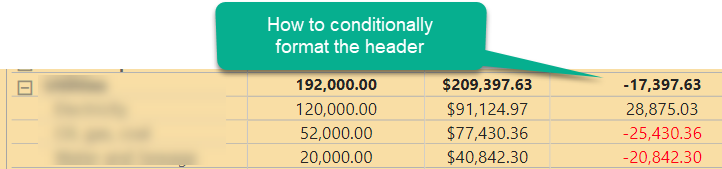
How do I conditionally format the top level. It's properly formatting negatives when I open up the row, but the top level row itself is not formatting.
Solved! Go to Solution.
Click the Apply to dropdown in the conditional formatting advanced controls dialog and choose Values and Totals.
HTH,
Smitty
Hi @Anonymous ,
To clarify from your screenshot, you are not trying to format the header but rather the top line/total line for that level of the Matrix. To format that all you do is select the field from the values drop down in the visualizations pane and then select conditional formatting.
If you really are trying to format a Header, then the Matrix visual gives you a few options. You can select that field itself on the Fields list and change the way it looks, or you can select the Format option in the Visualizations for that visual and modify the "Column Headers" or the "Field Formatting" or the Conditional Formatting" for that field.
Proud to be a Datanaut!
Private message me for consulting or training needs.
Thank you Smitty! I have applied to both values and totals and it's working. Much thanks and respect to your name.
zach
Click the Apply to dropdown in the conditional formatting advanced controls dialog and choose Values and Totals.
HTH,
Smitty
Share feedback directly with Fabric product managers, participate in targeted research studies and influence the Fabric roadmap.
Check out the February 2026 Power BI update to learn about new features.
| User | Count |
|---|---|
| 63 | |
| 55 | |
| 41 | |
| 16 | |
| 14 |
| User | Count |
|---|---|
| 97 | |
| 80 | |
| 35 | |
| 29 | |
| 25 |