cancel
Showing results for 
Search instead for 
Did you mean: 

The Power BI Data Visualization World Championships is back! Get ahead of the game and start preparing now! Learn more

Reply
lkshck
Helper III
Helper III

Combining several IF/Else Statements

Hey,

I'm having a table of Azure Cost Management which contains a lot of Cost data and I would like to introduce a Column called Business Service. Currently I made a new Column for every Business service and defined the input for the Values like the following:


ServiceA_Allocation = 
    IF (
        CONTAINSSTRINGEXACT('Usage details'[JsonTags.area], "dl-big-data")
            || CONTAINSSTRING('Usage details'[ReservationName],"Big-Data" )
            || CONTAINSSTRING('Usage details'[ReservationName],"ADX" ),
        1,
        0
    )


As this get's to complex with more and more Business Services I would like to combine them into just one Column by having one big IF/Else statement. The other statements look very similar to the example of ServiceA. Would that be the best way to do it or is there a better way? Firstly I thought about having some kind of CSV file where I define all my business services which such a logic, updating it from time to time if it's needed any PowerBI will handle it after update is done. 

Maybe worth to mention, the table contains around 21 million cells, so it's quite a lot of data and calculation could take time, so maybe there is also a faster way than do it like this.


Thanks in advance!

1 ACCEPTED SOLUTION

Got it in the first step running with this one:

Business Service = 
SWITCH(
  TRUE(),
  CONTAINSSTRINGEXACT('Usage details'[JsonTags.area], "dl-big-data")=TRUE(), "Data Engineering",
  CONTAINSSTRING('Usage details'[ReservationName], "Big-Data")=TRUE(), "Data Engineering",
  CONTAINSSTRING('Usage details'[ReservationName], "ADX")=TRUE(), "Data Engineering",
  "Unallocated"
)


View solution in original post

3 REPLIES 3
henktermaat
Regular Visitor

Hello Lkshck,


Maybe ‘SWITCH’ can help  you? Implemented would be as follows:


SWICTH(

  TRUE,

  CONTAINSSTRINGEXACT('Usage details'[JsonTags.area] = "dl-big-data", 1,

  CONTAINSSTRING('Usage details'[ReservationName] = "Big-Data", 1,

  CONTAINSSTRING('Usage details'[ReservationName] = "ADX",1,

  0

)

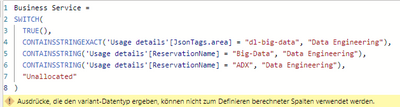
Looks like this doesn't work.

lkshck_0-1686927511140.png


Got it in the first step running with this one:

Business Service = 
SWITCH(
  TRUE(),
  CONTAINSSTRINGEXACT('Usage details'[JsonTags.area], "dl-big-data")=TRUE(), "Data Engineering",
  CONTAINSSTRING('Usage details'[ReservationName], "Big-Data")=TRUE(), "Data Engineering",
  CONTAINSSTRING('Usage details'[ReservationName], "ADX")=TRUE(), "Data Engineering",
  "Unallocated"
)


Helpful resources

Announcements
November Power BI Update Carousel

Power BI Monthly Update - November 2025

Check out the November 2025 Power BI update to learn about new features.

Fabric Data Days Carousel

Fabric Data Days

Advance your Data & AI career with 50 days of live learning, contests, hands-on challenges, study groups & certifications and more!

FabCon Atlanta 2026 carousel

FabCon Atlanta 2026

Join us at FabCon Atlanta, March 16-20, for the ultimate Fabric, Power BI, AI and SQL community-led event. Save $200 with code FABCOMM.

Top Solution Authors
Top Kudoed Authors