Join us in Barcelona for FabCon and SQLCon, September 28 - October 1, 2026.
This is best Fabric, Power BI, SQL and AI community event. How do we know? The last event sold out! Save €200 with code FABCMTY200.
Register now- Power BI forums
- Get Help with Power BI
- Desktop
- Service
- Report Server
- Power Query
- Mobile Apps
- Developer
- DAX Commands and Tips
- Custom Visuals Development Discussion
- Health and Life Sciences
- Power BI Spanish forums
- Translated Spanish Desktop
- Training and Consulting
- Instructor Led Training
- Dashboard in a Day for Women, by Women
- Galleries
- Data Stories Gallery
- Themes Gallery
- Contests Gallery
- QuickViz Gallery
- Quick Measures Gallery
- Visual Calculations Gallery
- Fabric Apps Gallery
- Notebook Gallery
- Translytical Task Flow Gallery
- TMDL Gallery
- R Script Showcase
- Webinars and Video Gallery
- Ideas
- Custom Visuals Ideas (read-only)
- Issues
- Issues
- Events
- Upcoming Events
The Fabric community is now in read-only for platform upgrade. Learn more
- Power BI forums
- Forums
- Get Help with Power BI
- Desktop
- Re: Combining IF Statements
- Subscribe to RSS Feed
- Mark Topic as New
- Mark Topic as Read
- Float this Topic for Current User
- Bookmark
- Subscribe
- Printer Friendly Page


- Mark as New
- Bookmark
- Subscribe
- Mute
- Subscribe to RSS Feed
- Permalink
Combining IF Statements
Hi, can someone please help to combine these two statements.
Firs Statement:
IF(ISBLANK([Date.Actual.Start]),BLANK(),}
IF(ISBLANK([Date.Actual.Completion]),BLANK(),
(DATEDIFF([Date.Actual.Start],[Date.Actual.Completion],DAY))))
2nd Statment:
IF( NOT( ISBLANK( [Date.Actual.Start] ) ),
IF(ISBLANK([Date.Actual.Completion]),
DATEDIFF([Date.Actual.Start], [If.Today],DAY)))
Solved! Go to Solution.
- Mark as New
- Bookmark
- Subscribe
- Mute
- Subscribe to RSS Feed
- Permalink
Hi @mohammadyousaf ,
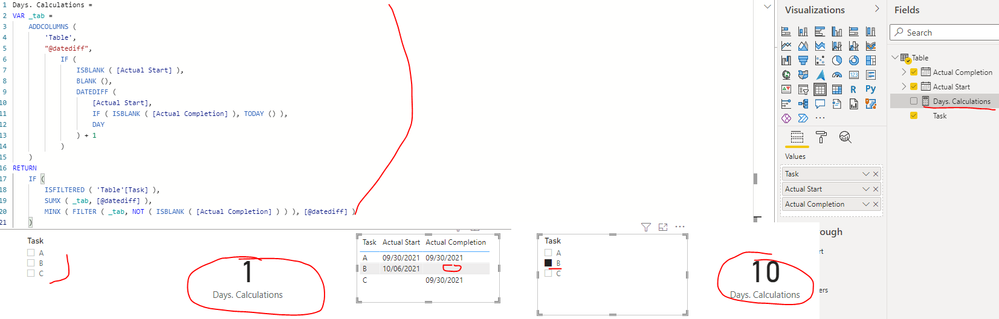
I created a sample pbix file(see attachment), please check whether that is what you want. You can create a measure as below to get the Days.Calculations:
Days.Calculations =
VAR _tab =
    ADDCOLUMNS (
        'Table',
        "@datediff",
            IF (
                ISBLANK ( [Actual Start] ),
                BLANK (),
                DATEDIFF (
                    [Actual Start],
                    IF ( ISBLANK ( [Actual Completion] ), TODAY () ),
                    DAY
                ) + 1
            )
    )
RETURN
    IF (
        ISFILTERED ( 'Table'[Task] ),
        SUMX ( _tab, [@datediff] ),
        MINX ( FILTER ( _tab, NOT ( ISBLANK ( [Actual Completion] ) ) ), [@datediff] )
    )
Best Regards


- Mark as New
- Bookmark
- Subscribe
- Mute
- Subscribe to RSS Feed
- Permalink
@mohammadyousaf , Try like
IF(ISBLANK([Date.Actual.Start]),BLANK(),
IF(ISBLANK([Date.Actual.Completion]),DATEDIFF([Date.Actual.Start], [If.Today],DAY),
(DATEDIFF([Date.Actual.Start],[Date.Actual.Completion],DAY))))
- Mark as New
- Bookmark
- Subscribe
- Mute
- Subscribe to RSS Feed
- Permalink
Thank you, I tried this as well but can not get my desired out put.
I have multiple rows as below:
| Task | Actual Start | Actual Completion |
| A | 30-Sep-2021 | 30-Sep-2021 |
| B | 6-Oct-2021 | |
So when I select A, it shows me 1 day as added +1 in the above statement
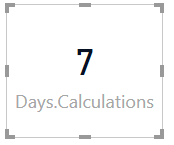
When I select B, it shows me 7 days
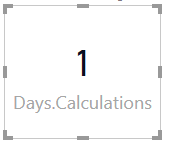
But when none is selected, it doesnt calculate Actual - Today. It just calculate 1 form A. What I am trying to achieve DATEDIFF from 30 Sep to Today.
- Mark as New
- Bookmark
- Subscribe
- Mute
- Subscribe to RSS Feed
- Permalink
@mohammadyousaf , selected value, means you are looking for a measure? or for a column
Can you share sample data and sample output in table format?
- Mark as New
- Bookmark
- Subscribe
- Mute
- Subscribe to RSS Feed
- Permalink
Measure.. I have chart with values A & B
so when I select A
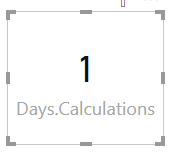
When I select B
here when A or B not selected
it shows 1, and i want it to be MIN of Actal Start - Today() because B is still in progress and it should calculate unless there is a completion date.
- Mark as New
- Bookmark
- Subscribe
- Mute
- Subscribe to RSS Feed
- Permalink
Hi @mohammadyousaf ,
I created a sample pbix file(see attachment), please check whether that is what you want. You can create a measure as below to get the Days.Calculations:
Days.Calculations =
VAR _tab =
    ADDCOLUMNS (
        'Table',
        "@datediff",
            IF (
                ISBLANK ( [Actual Start] ),
                BLANK (),
                DATEDIFF (
                    [Actual Start],
                    IF ( ISBLANK ( [Actual Completion] ), TODAY () ),
                    DAY
                ) + 1
            )
    )
RETURN
    IF (
        ISFILTERED ( 'Table'[Task] ),
        SUMX ( _tab, [@datediff] ),
        MINX ( FILTER ( _tab, NOT ( ISBLANK ( [Actual Completion] ) ) ), [@datediff] )
    )
Best Regards

Helpful resources

FabCon & SQLCon – Barcelona 2026
Join us in Barcelona for FabCon and SQLCon, the Fabric, Power BI, SQL, and AI community event. Save €200 with code FABCMTY200.

Power BI DataViz World Championships - June 2026
A new Power BI DataViz World Championship is coming this June! Don't miss out on submitting your entry.

| User | Count |
|---|---|
| 21 | |
| 21 | |
| 14 | |
| 14 | |
| 13 |


| User | Count |
|---|---|
| 47 | |
| 35 | |
| 24 | |
| 20 | |
| 19 |


