This time we’re going bigger than ever. Fabric, Power BI, SQL, AI and more. We're covering it all. You won't want to miss it.
Learn moreLevel up your Power BI skills this month - build one visual each week and tell better stories with data! Get started
Hello,
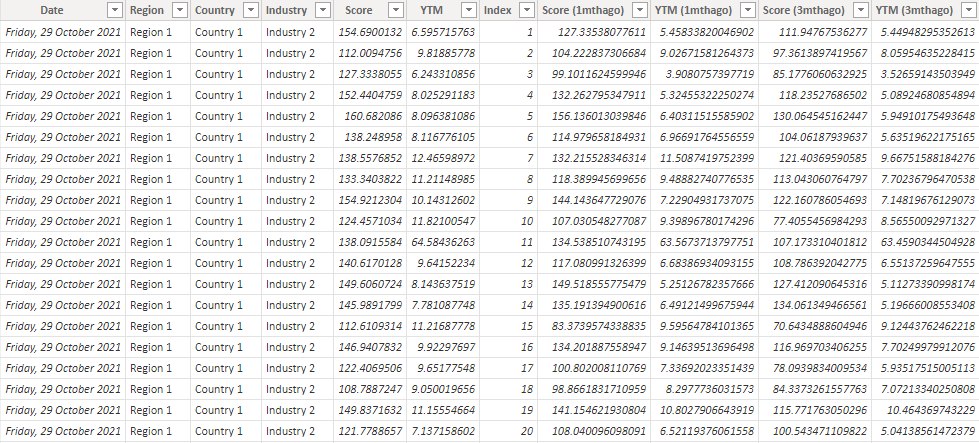
I'm trying to combine different measures into the same graph. Currently, my dataset looks like this:
I have measures that calculate the average for each industry at each timeframe:
Score =
AVERAGEX(
KEEPFILTERS(VALUES('Data'[Industry])),
CALCULATE(AVERAGE('Data'[Score]))
)Score (1mthago) =
AVERAGEX(
KEEPFILTERS(VALUES('Data'[Industry])),
CALCULATE(AVERAGE('Data'[Score (1mthago)]))
)YTM =
AVERAGEX(
KEEPFILTERS(VALUES('Data'[Industry])),
CALCULATE(AVERAGE('Data'[YTM]))
)YTM (1mthago) =
AVERAGEX(
KEEPFILTERS(VALUES('Data'[Industry])),
CALCULATE(AVERAGE('Data'[YTM (1mthago)]))
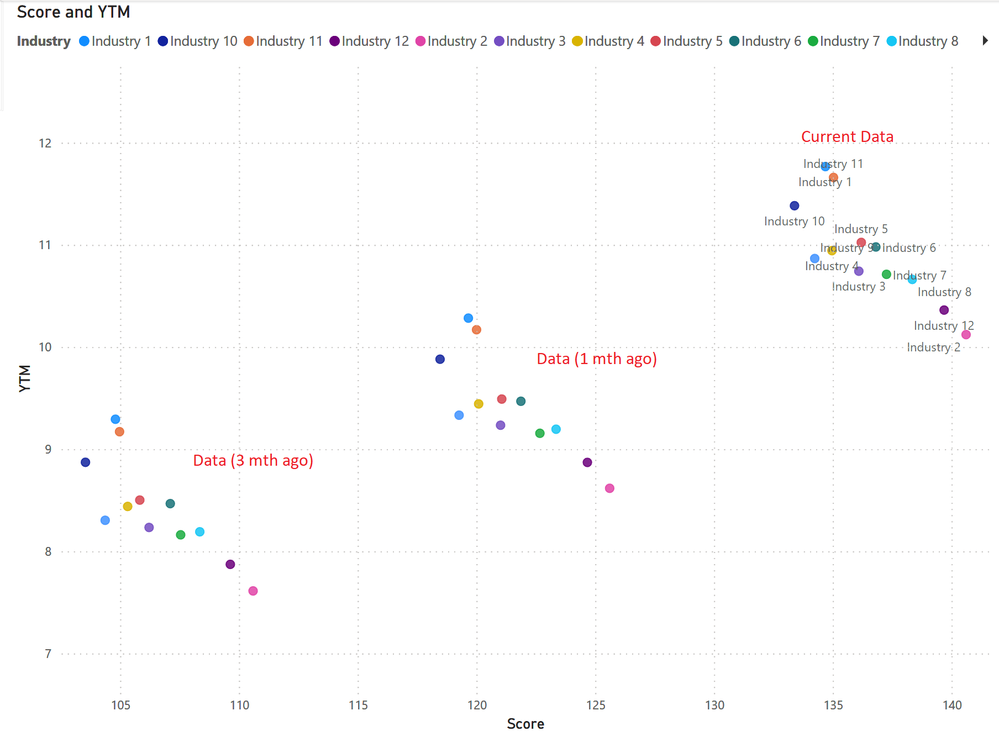
)I'm trying to create a graph that looks like this:
However, I am unable to put the measures into the same scatter plot. Instead, I am currently overlaying 3 seperate scatter plots to achieve this graph. Are there anyway to combine these measures into the same visual?
I have uploaded sample data here: https://drive.google.com/file/d/17MYxjTzoqZxxKdHFdtM5drRZo-0jbWz-/view?usp=sharing
Thank you
@Deermeat , You are using both details and legend. If you use one of them you can create a calculation group on these measures and use that either on details or legend
Calculation Groups- Measure Slicer, Measure Header Grouping, Measure to dimension conversion. Complex Table display : https://youtu.be/qMNv67P8Go0
Check out the April 2026 Power BI update to learn about new features.
Sign up to receive a private message when registration opens and key events begin.
If you have recently started exploring Fabric, we'd love to hear how it's going. Your feedback can help with product improvements.
| User | Count |
|---|---|
| 37 | |
| 32 | |
| 27 | |
| 24 | |
| 17 |
| User | Count |
|---|---|
| 70 | |
| 50 | |
| 31 | |
| 26 | |
| 22 |