Join us at FabCon Atlanta from March 16 - 20, 2026, for the ultimate Fabric, Power BI, AI and SQL community-led event. Save $200 with code FABCOMM.
Register now!View all the Fabric Data Days sessions on demand. View schedule
Hello,
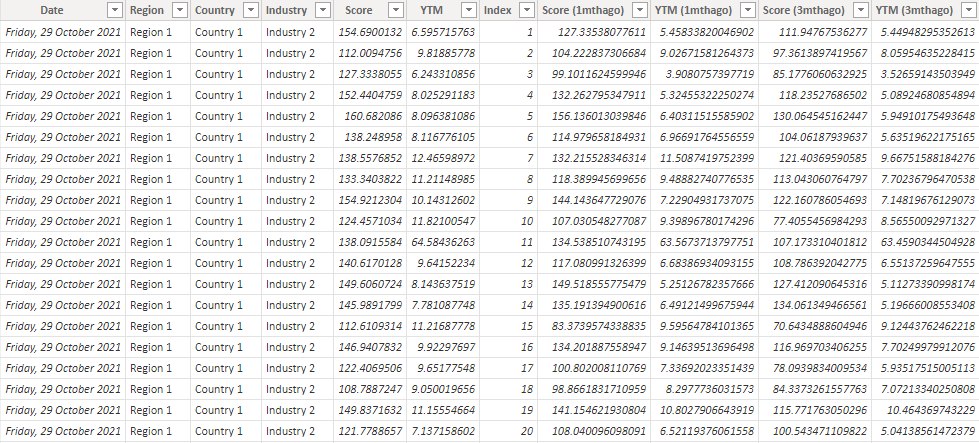
I'm trying to combine different measures into the same graph. Currently, my dataset looks like this:
I have measures that calculate the average for each industry at each timeframe:
Score =
AVERAGEX(
KEEPFILTERS(VALUES('Data'[Industry])),
CALCULATE(AVERAGE('Data'[Score]))
)Score (1mthago) =
AVERAGEX(
KEEPFILTERS(VALUES('Data'[Industry])),
CALCULATE(AVERAGE('Data'[Score (1mthago)]))
)YTM =
AVERAGEX(
KEEPFILTERS(VALUES('Data'[Industry])),
CALCULATE(AVERAGE('Data'[YTM]))
)YTM (1mthago) =
AVERAGEX(
KEEPFILTERS(VALUES('Data'[Industry])),
CALCULATE(AVERAGE('Data'[YTM (1mthago)]))
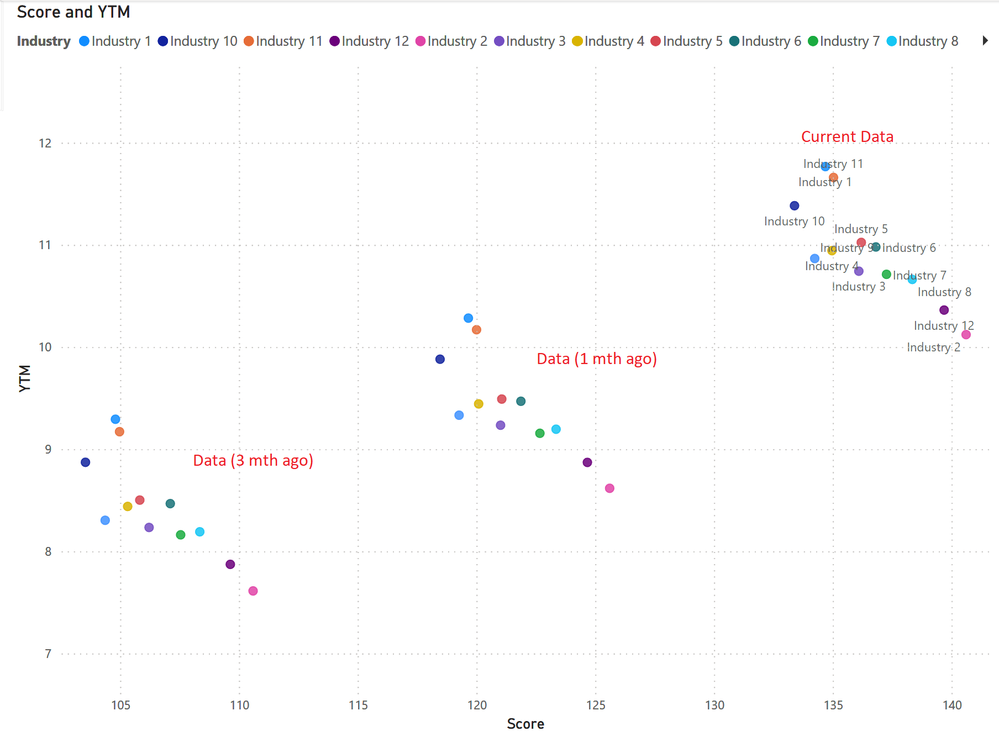
)I'm trying to create a graph that looks like this:
However, I am unable to put the measures into the same scatter plot. Instead, I am currently overlaying 3 seperate scatter plots to achieve this graph. Are there anyway to combine these measures into the same visual?
I have uploaded sample data here: https://drive.google.com/file/d/17MYxjTzoqZxxKdHFdtM5drRZo-0jbWz-/view?usp=sharing
Thank you
@Deermeat , You are using both details and legend. If you use one of them you can create a calculation group on these measures and use that either on details or legend
Calculation Groups- Measure Slicer, Measure Header Grouping, Measure to dimension conversion. Complex Table display : https://youtu.be/qMNv67P8Go0
Check out the November 2025 Power BI update to learn about new features.
Advance your Data & AI career with 50 days of live learning, contests, hands-on challenges, study groups & certifications and more!