cancel
Showing results for 
Search instead for 
Did you mean: 

July 7 - July 17 | Round 2 of the Power BI Dataviz World Championships. Don't miss your chance! Learn more

Reply
Deermeat
Resolver I
Resolver I

Combining Different Measures into A Scatterplot

Hello,

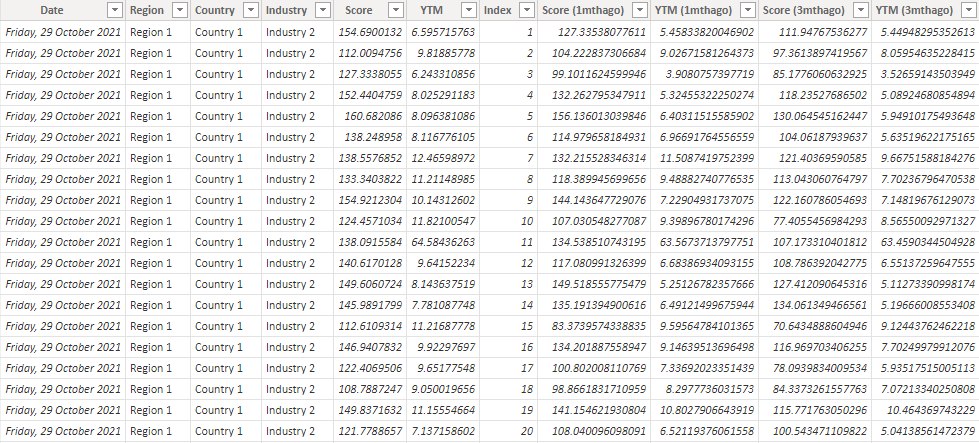
I'm trying to combine different measures into the same graph. Currently, my dataset looks like this:

Untitled.png

I have measures that calculate the average for each industry at each timeframe:

Score = 
AVERAGEX(
	KEEPFILTERS(VALUES('Data'[Industry])),
	CALCULATE(AVERAGE('Data'[Score]))
)
Score (1mthago) = 
AVERAGEX(
	KEEPFILTERS(VALUES('Data'[Industry])),
	CALCULATE(AVERAGE('Data'[Score (1mthago)]))
)
YTM = 
AVERAGEX(
	KEEPFILTERS(VALUES('Data'[Industry])),
	CALCULATE(AVERAGE('Data'[YTM]))
)
YTM (1mthago) = 
AVERAGEX(
	KEEPFILTERS(VALUES('Data'[Industry])),
	CALCULATE(AVERAGE('Data'[YTM (1mthago)]))
)

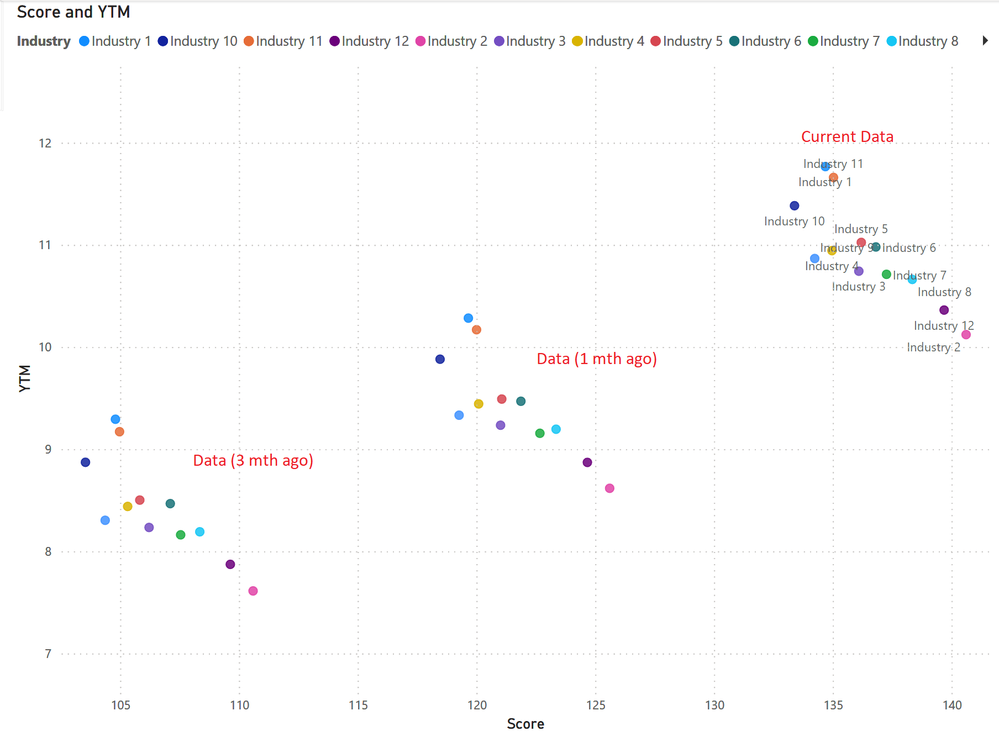
I'm trying to create a graph that looks like this:

Untitled.png

However, I am unable to put the measures into the same scatter plot. Instead, I am currently overlaying 3 seperate scatter plots to achieve this graph. Are there anyway to combine these measures into the same visual?

I have uploaded sample data here: https://drive.google.com/file/d/17MYxjTzoqZxxKdHFdtM5drRZo-0jbWz-/view?usp=sharing

Thank you

1 REPLY 1
amitchandak
Super User
Super User

@Deermeat , You are using both details and legend. If you use one of them you can create a calculation group on these measures and use that either on details or legend 


Calculation Groups- Measure Slicer, Measure Header Grouping, Measure to dimension conversion. Complex Table display : https://youtu.be/qMNv67P8Go0

Share with Power BI Enthusiasts: Full Power BI Video (20 Hours) YouTube
Microsoft Fabric Series 60+ Videos YouTube
Microsoft Fabric Hindi End to End YouTube

Helpful resources

Announcements
FabCon and SQLCon Barcelona 2026

FabCon & SQLCon – Barcelona 2026

Join us in Barcelona for FabCon and SQLCon, the Fabric, Power BI, SQL, and AI community event. Save €200 with code FABCMTY200.

60 days of Data Days Carousel

Data Days 2026

Join Fabric Data Days 2026: 60 days of free live/on-demand sessions, challenges, study groups, and certification opportunities.

Power BI DataViz World Championships carousel

Power BI DataViz World Championships - June 2026

A new Power BI DataViz World Championship is coming this June! Don't miss out on submitting your entry.