Learn from the best! Meet the four finalists headed to the FINALS of the Power BI Dataviz World Championships! Register now
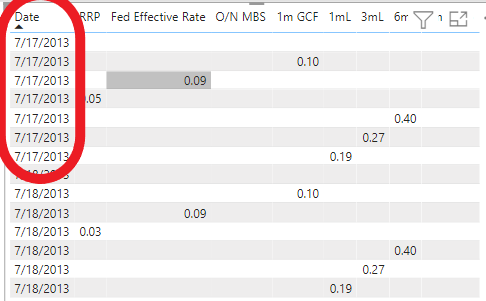
I have different fields all associated with the same date but for some reason I'm getting multiple lines instead of just showing it under one single day. How can I fix this?
Solved! Go to Solution.
Hi @hspenik3
Use Matrix and put the dates in the Column
Regards
Amine Jerbi
If I answered your question, please mark this thread as accepted
and you can follow me on
My Website, LinkedIn and Facebook
HI @hspenik3,
Can please share some dummy data with a similar data structure and expected results? It should help us clarify your scenario and test to coding formula.
How to Get Your Question Answered Quickly
Regards,
Xiaoxin Sheng
@hspenik3 , I think your date has a time stamp, and you are not able to see it because of the format.
Change the data type to date/time and choose a format that can show you time
and get a date column like
new Date = [Date].date
or
new Date = date(year([Date]),month([Date]),day([Date]))
Hi @hspenik3
Use Matrix and put the dates in the Column
Regards
Amine Jerbi
If I answered your question, please mark this thread as accepted
and you can follow me on
My Website, LinkedIn and Facebook
If you have recently started exploring Fabric, we'd love to hear how it's going. Your feedback can help with product improvements.
A new Power BI DataViz World Championship is coming this June! Don't miss out on submitting your entry.
Share feedback directly with Fabric product managers, participate in targeted research studies and influence the Fabric roadmap.
| User | Count |
|---|---|
| 57 | |
| 33 | |
| 33 | |
| 18 | |
| 16 |
| User | Count |
|---|---|
| 66 | |
| 64 | |
| 44 | |
| 30 | |
| 29 |