cancel
Showing results for 
Search instead for 
Did you mean: 

We've captured the moments from FabCon & SQLCon that everyone is talking about, and we are bringing them to the community, live and on-demand. Starts on April 14th. Register now

Reply
wbadri
Frequent Visitor

Combine multiple rows with condition

Hi, 

I want to join two cell with same ID in one cell, the below shows the original data, I want to join channel column in one raw


Local Cell IDEquipment IDSector IDCabinet No.Subrack No.Slot No.Channel
41191000700R0A
41191000700R0B
41191000700R0C
41196000700R0A
41196000700R0B
41192110710R0A
41192110710R0B
50987110710R0A
50987110710R0B
50987110710R0C
50987110710R0D

This is the required results:


Local Cell IDEquipment IDSector IDCabinet No.Subrack No.Slot No.Channel
41191000700R0A,R0B,R0C
41196000700R0A,R0B
41192110710R0A,R0B
50987110710R0A,R0B,R0C,R0D


How can i do this? 

Thanks in advance

1 ACCEPTED SOLUTION
v-diye-msft
Community Support
Community Support

Hi @wbadri 


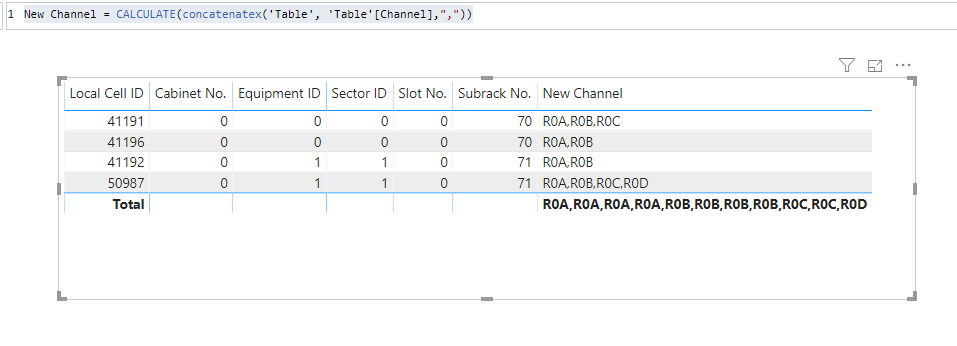
Please use the below measure:


New Channel = CALCULATE(concatenatex('Table', 'Table'[Channel],","))


009.PNG

Community Support Team _ Dina Ye
If this post helps, then please consider Accept it as the solution to help the other members find it more
quickly.

View solution in original post

5 REPLIES 5
v-diye-msft
Community Support
Community Support

Hi @wbadri 


Please use the below measure:


New Channel = CALCULATE(concatenatex('Table', 'Table'[Channel],","))


009.PNG

Community Support Team _ Dina Ye
If this post helps, then please consider Accept it as the solution to help the other members find it more
quickly.

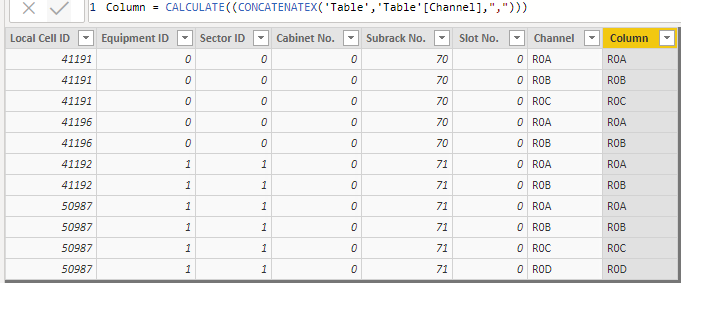
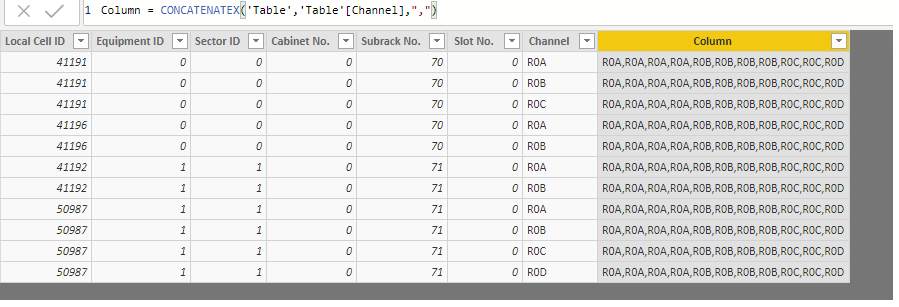
Thank you very much,  I'm close to the answer, when I use the equation it depends on subrack no. where I want it to depend on local cell ID as differentiator:


Untitled2.png


Untitled.png


  Thank you very much @v-diye-msft 


Hi @wbadri 


Please use it as a measure not a calculated column. 

Community Support Team _ Dina Ye
If this post helps, then please consider Accept it as the solution to help the other members find it more
quickly.

Oh I can uderstand you, your solution worked perfectly, but can I edit the table in order to fix data and to remove dublicate rows that was from excel original excel sheet.

amitchandak
Super User
Super User

use concatenatex

https://docs.microsoft.com/en-us/dax/concatenatex-function-dax


New Channel = concatenatex(table, channel)

Appreciate your Kudos. In case, this is the solution you are looking for, mark it as the Solution. In case it does not help, please provide additional information and mark me with @
Thanks. My Recent Blog -
https://community.powerbi.com/t5/Community-Blog/HR-Analytics-Active-Employee-Hire-and-Termination-tr...
https://community.powerbi.com/t5/Community-Blog/Power-BI-Working-with-Non-Standard-Time-Periods/ba-p...
https://community.powerbi.com/t5/Community-Blog/Comparing-Data-Across-Date-Ranges/ba-p/823601

Share with Power BI Enthusiasts: Full Power BI Video (20 Hours) YouTube
Microsoft Fabric Series 60+ Videos YouTube
Microsoft Fabric Hindi End to End YouTube

Helpful resources

Announcements
New to Fabric survey Carousel

New to Fabric Survey

If you have recently started exploring Fabric, we'd love to hear how it's going. Your feedback can help with product improvements.

Power BI DataViz World Championships carousel

Power BI DataViz World Championships - June 2026

A new Power BI DataViz World Championship is coming this June! Don't miss out on submitting your entry.

Join our Fabric User Panel

Join our Fabric User Panel

Share feedback directly with Fabric product managers, participate in targeted research studies and influence the Fabric roadmap.