Join us at FabCon Atlanta from March 16 - 20, 2026, for the ultimate Fabric, Power BI, AI and SQL community-led event. Save $200 with code FABCOMM.
Register now!Learn from the best! Meet the four finalists headed to the FINALS of the Power BI Dataviz World Championships! Register now
Hi,
I want to join two cell with same ID in one cell, the below shows the original data, I want to join channel column in one raw
| Local Cell ID | Equipment ID | Sector ID | Cabinet No. | Subrack No. | Slot No. | Channel |
| 41191 | 0 | 0 | 0 | 70 | 0 | R0A |
| 41191 | 0 | 0 | 0 | 70 | 0 | R0B |
| 41191 | 0 | 0 | 0 | 70 | 0 | R0C |
| 41196 | 0 | 0 | 0 | 70 | 0 | R0A |
| 41196 | 0 | 0 | 0 | 70 | 0 | R0B |
| 41192 | 1 | 1 | 0 | 71 | 0 | R0A |
| 41192 | 1 | 1 | 0 | 71 | 0 | R0B |
| 50987 | 1 | 1 | 0 | 71 | 0 | R0A |
| 50987 | 1 | 1 | 0 | 71 | 0 | R0B |
| 50987 | 1 | 1 | 0 | 71 | 0 | R0C |
| 50987 | 1 | 1 | 0 | 71 | 0 | R0D |
This is the required results:
| Local Cell ID | Equipment ID | Sector ID | Cabinet No. | Subrack No. | Slot No. | Channel |
| 41191 | 0 | 0 | 0 | 70 | 0 | R0A,R0B,R0C |
| 41196 | 0 | 0 | 0 | 70 | 0 | R0A,R0B |
| 41192 | 1 | 1 | 0 | 71 | 0 | R0A,R0B |
| 50987 | 1 | 1 | 0 | 71 | 0 | R0A,R0B,R0C,R0D |
How can i do this?
Thanks in advance
Solved! Go to Solution.
Hi @wbadri
Please use the below measure:
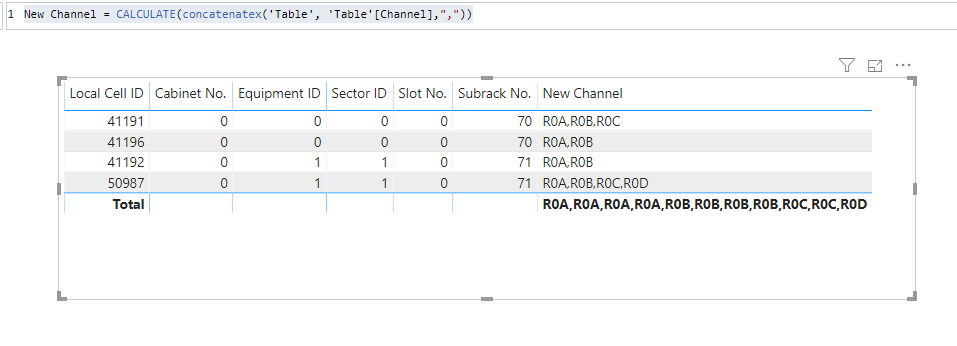
New Channel = CALCULATE(concatenatex('Table', 'Table'[Channel],","))
Hi @wbadri
Please use the below measure:
New Channel = CALCULATE(concatenatex('Table', 'Table'[Channel],","))
Thank you very much, I'm close to the answer, when I use the equation it depends on subrack no. where I want it to depend on local cell ID as differentiator:
Thank you very much @v-diye-msft
Hi @wbadri
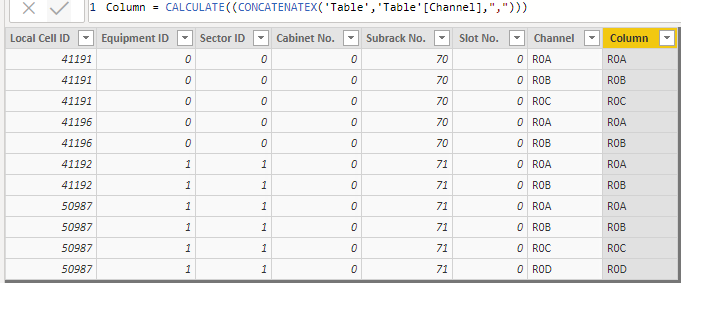
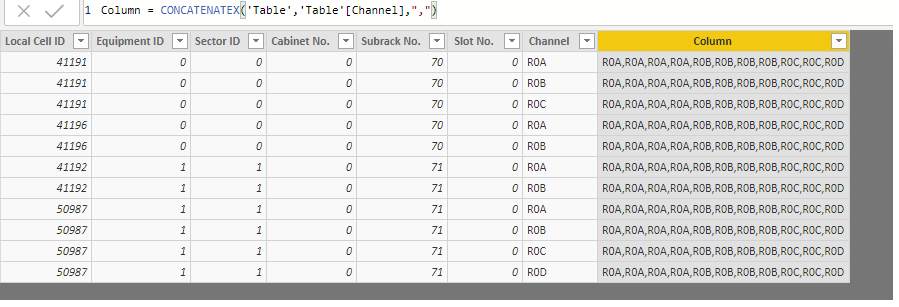
Please use it as a measure not a calculated column.
Oh I can uderstand you, your solution worked perfectly, but can I edit the table in order to fix data and to remove dublicate rows that was from excel original excel sheet.
use concatenatex
https://docs.microsoft.com/en-us/dax/concatenatex-function-dax
New Channel = concatenatex(table, channel)Appreciate your Kudos. In case, this is the solution you are looking for, mark it as the Solution. In case it does not help, please provide additional information and mark me with @
Thanks. My Recent Blog -
https://community.powerbi.com/t5/Community-Blog/HR-Analytics-Active-Employee-Hire-and-Termination-tr...
https://community.powerbi.com/t5/Community-Blog/Power-BI-Working-with-Non-Standard-Time-Periods/ba-p...
https://community.powerbi.com/t5/Community-Blog/Comparing-Data-Across-Date-Ranges/ba-p/823601
Share feedback directly with Fabric product managers, participate in targeted research studies and influence the Fabric roadmap.
Check out the February 2026 Power BI update to learn about new features.
| User | Count |
|---|---|
| 61 | |
| 59 | |
| 42 | |
| 18 | |
| 15 |
| User | Count |
|---|---|
| 108 | |
| 100 | |
| 39 | |
| 29 | |
| 29 |