cancel
Showing results for 
Search instead for 
Did you mean: 

The Power BI Data Visualization World Championships is back! Get ahead of the game and start preparing now! Learn more

Reply
Lilywhite63
New Member

Colour Saturation or Conditional Formatting

Hello

Can you please advise. I am using the latest version of PowerBi Desktop.

On my screen is a very basic column chart (I am learning the product), I wish to graduate the colour  from dark blue to light blue as the columns decrease in size - i.e. as the amounts they represent decrease. I have found lots of videos that mention Colour Saturation and Conditional formating but I can't find either on my system I have used Search on the screen but nothing comes up for either option. Is this function still possible?


Lilywhite63_0-1671029964070.png


1 REPLY 1
1Daniel993
Helper III
Helper III

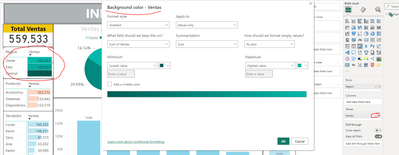
Hello If I understand well you need go to the fields that you put in a visual -> conditional formating and select the colour background that you need

1Daniel993_0-1671031162575.png


Regrads

Helpful resources

Announcements
Power BI DataViz World Championships

Power BI Dataviz World Championships

The Power BI Data Visualization World Championships is back! Get ahead of the game and start preparing now!

December 2025 Power BI Update Carousel

Power BI Monthly Update - December 2025

Check out the December 2025 Power BI Holiday Recap!

FabCon Atlanta 2026 carousel

FabCon Atlanta 2026

Join us at FabCon Atlanta, March 16-20, for the ultimate Fabric, Power BI, AI and SQL community-led event. Save $200 with code FABCOMM.