Share feedback directly with Fabric product managers, participate in targeted research studies and influence the Fabric roadmap.
Sign up nowGet Fabric certified for FREE! Don't miss your chance! Learn more
Hello
Can you please advise. I am using the latest version of PowerBi Desktop.
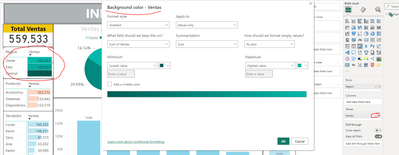
On my screen is a very basic column chart (I am learning the product), I wish to graduate the colour from dark blue to light blue as the columns decrease in size - i.e. as the amounts they represent decrease. I have found lots of videos that mention Colour Saturation and Conditional formating but I can't find either on my system I have used Search on the screen but nothing comes up for either option. Is this function still possible?
Hello If I understand well you need go to the fields that you put in a visual -> conditional formating and select the colour background that you need
Regrads
Share feedback directly with Fabric product managers, participate in targeted research studies and influence the Fabric roadmap.
| User | Count |
|---|---|
| 63 | |
| 62 | |
| 42 | |
| 19 | |
| 16 |
| User | Count |
|---|---|
| 113 | |
| 105 | |
| 36 | |
| 28 | |
| 28 |