This is best Fabric, Power BI, SQL and AI community event. How do we know? The last event sold out! Save €200 with code FABCMTY200.
Register nowA new Data Days event is coming soon! This time we’re going bigger than ever. Fabric, Power BI, SQL, AI and more. Don't miss out.
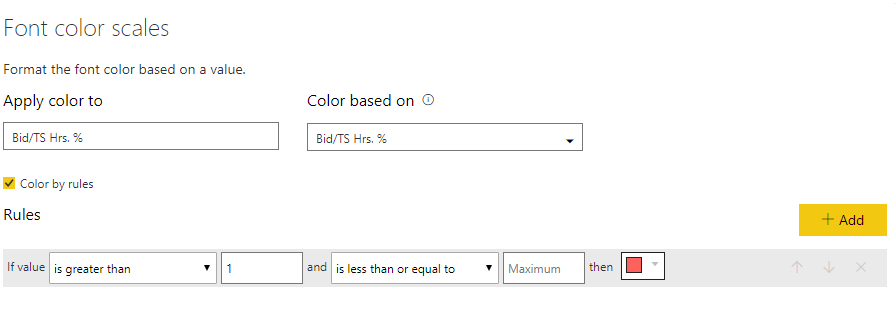
I have table with a budget to actual % measure that I want to be in red if it is greater than 100%. Meaning % over budget. I tried using font color scales with no success. See image. I have tried using 100 instead of 1 and that does not work.
What am I doing wrong?
Thanks,
Joe
Solved! Go to Solution.
hI @Black783,
How do you have the measure/column formatted?
I have made a sample with a column as % and it works with 1 as you have:
Regards,
MFelix
Regards
Miguel Félix
Proud to be a Super User!
Check out my blog: Power BI em PortuguêsMake the second part of your rule something outrageous like 999.
hI @Black783,
How do you have the measure/column formatted?
I have made a sample with a column as % and it works with 1 as you have:
Regards,
MFelix
Regards
Miguel Félix
Proud to be a Super User!
Check out my blog: Power BI em PortuguêsIt worked once I multiplied by 100 and left the value at 1.
Thanks,
Joe
Check out the May 2026 Power BI update to learn about new features.
Sign up to receive a private message when registration opens and key events begin.
If you have recently started exploring Fabric, we'd love to hear how it's going. Your feedback can help with product improvements.
| User | Count |
|---|---|
| 29 | |
| 27 | |
| 25 | |
| 20 | |
| 14 |
| User | Count |
|---|---|
| 53 | |
| 47 | |
| 22 | |
| 19 | |
| 19 |