Get certified for free when you join Fabric Data Days 2026 and dive into Fabric, Power BI, SQL, AI, and other essential data skills.
Join nowData Days is here! Join us now for 60+ days of learning, challenges, and connection. Learn more
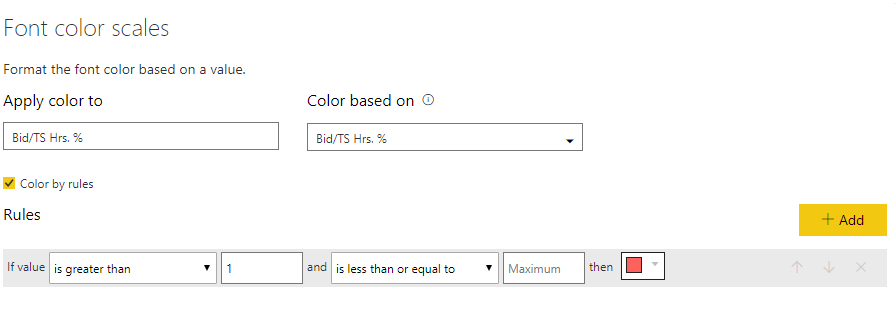
I have table with a budget to actual % measure that I want to be in red if it is greater than 100%. Meaning % over budget. I tried using font color scales with no success. See image. I have tried using 100 instead of 1 and that does not work.
What am I doing wrong?
Thanks,
Joe
Solved! Go to Solution.
hI @Black783,
How do you have the measure/column formatted?
I have made a sample with a column as % and it works with 1 as you have:
Regards,
MFelix
Regards
Miguel Félix
Proud to be a Super User!
Check out my blog: Power BI em PortuguêsMake the second part of your rule something outrageous like 999.
hI @Black783,
How do you have the measure/column formatted?
I have made a sample with a column as % and it works with 1 as you have:
Regards,
MFelix
Regards
Miguel Félix
Proud to be a Super User!
Check out my blog: Power BI em PortuguêsIt worked once I multiplied by 100 and left the value at 1.
Thanks,
Joe
Don't miss out on Data Days, June 15 through August 7. Learn Fabric, Power BI, SQL, AI and more.
Check out the May 2026 Power BI update to learn about new features.
| User | Count |
|---|---|
| 23 | |
| 23 | |
| 20 | |
| 18 | |
| 14 |
| User | Count |
|---|---|
| 58 | |
| 51 | |
| 40 | |
| 30 | |
| 24 |