Join us at FabCon Atlanta from March 16 - 20, 2026, for the ultimate Fabric, Power BI, AI and SQL community-led event. Save $200 with code FABCOMM.
Register now!The Power BI Data Visualization World Championships is back! It's time to submit your entry. Live now!
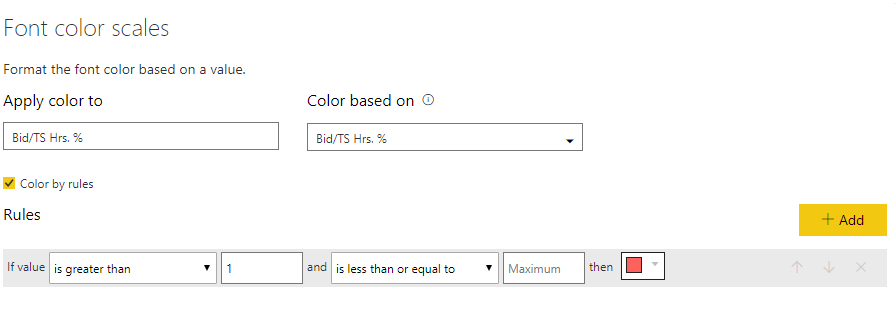
I have table with a budget to actual % measure that I want to be in red if it is greater than 100%. Meaning % over budget. I tried using font color scales with no success. See image. I have tried using 100 instead of 1 and that does not work.
What am I doing wrong?
Thanks,
Joe
Solved! Go to Solution.
hI @Black783,
How do you have the measure/column formatted?
I have made a sample with a column as % and it works with 1 as you have:
Regards,
MFelix
Regards
Miguel Félix
Proud to be a Super User!
Check out my blog: Power BI em PortuguêsMake the second part of your rule something outrageous like 999.
hI @Black783,
How do you have the measure/column formatted?
I have made a sample with a column as % and it works with 1 as you have:
Regards,
MFelix
Regards
Miguel Félix
Proud to be a Super User!
Check out my blog: Power BI em PortuguêsIt worked once I multiplied by 100 and left the value at 1.
Thanks,
Joe
The Power BI Data Visualization World Championships is back! It's time to submit your entry.
Check out the January 2026 Power BI update to learn about new features.
| User | Count |
|---|---|
| 56 | |
| 42 | |
| 40 | |
| 21 | |
| 20 |
| User | Count |
|---|---|
| 142 | |
| 105 | |
| 63 | |
| 36 | |
| 35 |