This time we’re going bigger than ever. Fabric, Power BI, SQL, AI and more. We're covering it all. You won't want to miss it.
Learn moreGet Fabric Certified for FREE during AI Skills Fest. This week only. Secure your voucher now.
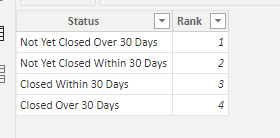
I made the table above (via Enter Data), named ReferenceTable, that connects ReferenceTable[Status] to DataTable[Status]. Want to sort my visual table in order prescribed in the above image.
DataTable
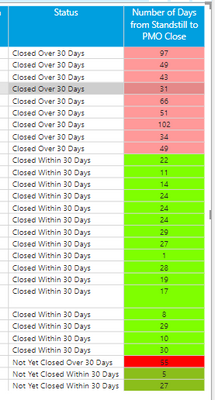
I selected Sort By Column using DataTable[Status]. However, when I looked at visuals the order is unaffected (see image below).
Any ideas?
If you have a dimension table (as you have) for Status, and there is a single one-to-many relationship between the ReferenceTable[Status] and the DataTable[Status], you don't need the DataTable[RankLookup] field.
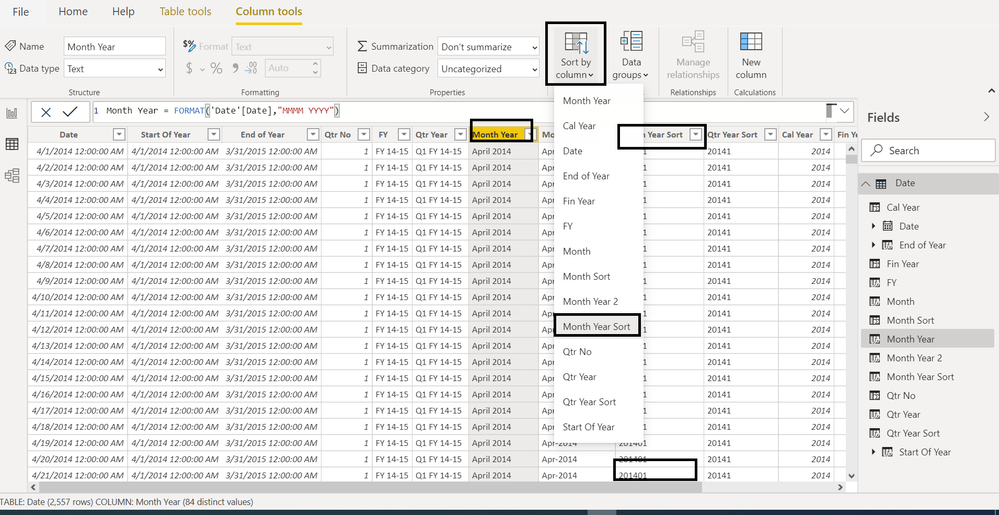
All you need to do is sort the ReferenceTable[Status] column by the ReferenceTable[Rank] column in the table view. Next create your visual using the ReferenceTable[Status] column and the measure
Proud to be a Super User!
Paul on Linkedin.
@Anonymous , Make sure rank lookup is used as sort column for status and visual is sorted on status
How to Create Sort Column and Solve Related Errors:
https://www.youtube.com/watch?v=KK1zu4MBb-c
Check out the May 2026 Power BI update to learn about new features.
Sign up to receive a private message when registration opens and key events begin.
If you have recently started exploring Fabric, we'd love to hear how it's going. Your feedback can help with product improvements.
| User | Count |
|---|---|
| 26 | |
| 25 | |
| 23 | |
| 19 | |
| 18 |
| User | Count |
|---|---|
| 43 | |
| 41 | |
| 41 | |
| 21 | |
| 21 |