cancel
Showing results for 
Search instead for 
Did you mean: 

July 7 - July 17 | Round 2 of the Power BI Dataviz World Championships. Don't miss your chance! Learn more

Reply
Anonymous
Not applicable

Cannot sort Table Visual using indexed column and custom sort

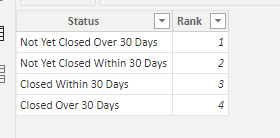
DataLedAnalysis_0-1662383610775.png

I made the table above (via Enter Data), named ReferenceTable, that connects ReferenceTable[Status] to DataTable[Status]. Want to sort my visual table in order prescribed in the above image.


DataTableDataTable


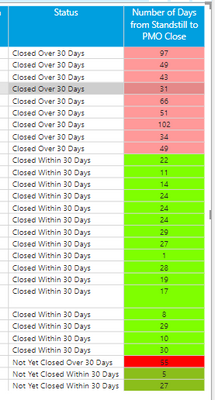
I selected Sort By Column using DataTable[Status]. However, when I looked at visuals the order is unaffected (see image below).


DataLedAnalysis_2-1662383873831.png

Any ideas?


2 REPLIES 2
PaulDBrown
Community Champion
Community Champion

If you have a dimension table (as you have) for Status, and there is a single one-to-many relationship between the ReferenceTable[Status] and the DataTable[Status], you don't need the DataTable[RankLookup] field.

All you need to do is sort the ReferenceTable[Status] column by the ReferenceTable[Rank] column in the table view. Next create your visual using the ReferenceTable[Status] column and the measure


Did I answer your question? Mark my post as a solution!
In doing so, you are also helping me. Thank you!

Proud to be a Super User!
Paul on Linkedin.


amitchandak
Super User
Super User

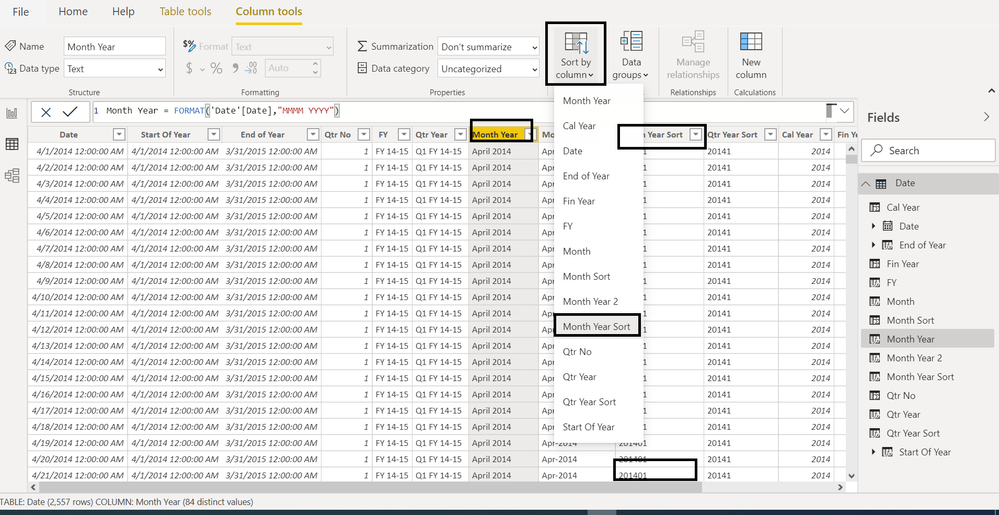
@Anonymous , Make sure rank lookup is used as sort column for status and visual is sorted on status


Sort Month Year.png


How to Create Sort Column and Solve Related Errors:
https://www.youtube.com/watch?v=KK1zu4MBb-c

Share with Power BI Enthusiasts: Full Power BI Video (20 Hours) YouTube
Microsoft Fabric Series 60+ Videos YouTube
Microsoft Fabric Hindi End to End YouTube

Helpful resources

Announcements
FabCon and SQLCon Barcelona 2026

FabCon & SQLCon – Barcelona 2026

Join us in Barcelona for FabCon and SQLCon, the Fabric, Power BI, SQL, and AI community event. Save €200 with code FABCMTY200.

60 days of Data Days Carousel

Data Days 2026

Join Fabric Data Days 2026: 60 days of free live/on-demand sessions, challenges, study groups, and certification opportunities.

Power BI DataViz World Championships carousel

Power BI DataViz World Championships - June 2026

A new Power BI DataViz World Championship is coming this June! Don't miss out on submitting your entry.

Top Solution Authors