Join us at FabCon Atlanta from March 16 - 20, 2026, for the ultimate Fabric, Power BI, AI and SQL community-led event. Save $200 with code FABCOMM.
Register now!Get Fabric certified for FREE! Don't miss your chance! Learn more
Hi,
I'm trying to group visuals, as explained in this link. Grouping visuals
However, I simply don't have any option at right-click to gropu visuals. I've just downloaded the most recent PowerBi, which was suggested in this question.
Any advice please?
Kind regards,
Malan
Solved! Go to Solution.
Hi @Anonymous ,
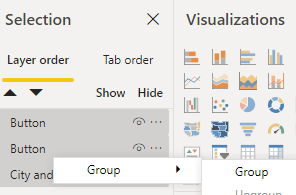
You need to use Ctrl+Left Click to select these layer in the selection pane. Then Right Click it and group menu will appear.
Hi @v-eachen-msft , The selection pane was open when I tried that. Still no option on right-click for grouping visuals. (I also right-clicked in various places, to make sure it's not about clicking in a data area or so).
Hi @Anonymous ,
You need to use Ctrl+Left Click to select these layer in the selection pane. Then Right Click it and group menu will appear.
Hi @Anonymous ,
You need to active selection pane firstly.
Then follow the document you mentioned.
Share feedback directly with Fabric product managers, participate in targeted research studies and influence the Fabric roadmap.
| User | Count |
|---|---|
| 68 | |
| 59 | |
| 44 | |
| 20 | |
| 15 |
| User | Count |
|---|---|
| 104 | |
| 102 | |
| 37 | |
| 26 | |
| 25 |