Don't miss your chance to take the Fabric Data Engineer (DP-600) exam for FREE! Find out how by watching the DP-600 session on-demand now through April 28th.
Learn moreJoin the FabCon + SQLCon recap series. Up next: Power BI, Real-Time Intelligence, IQ and AI, and Data Factory take center stage. All sessions are available on-demand after the live show. Register now
Hi,
I'm trying to group visuals, as explained in this link. Grouping visuals
However, I simply don't have any option at right-click to gropu visuals. I've just downloaded the most recent PowerBi, which was suggested in this question.
Any advice please?
Kind regards,
Malan
Solved! Go to Solution.
Hi @Anonymous ,
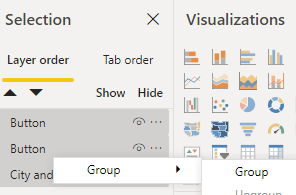
You need to use Ctrl+Left Click to select these layer in the selection pane. Then Right Click it and group menu will appear.
Hi @v-eachen-msft , The selection pane was open when I tried that. Still no option on right-click for grouping visuals. (I also right-clicked in various places, to make sure it's not about clicking in a data area or so).
Hi @Anonymous ,
You need to use Ctrl+Left Click to select these layer in the selection pane. Then Right Click it and group menu will appear.
Hi @Anonymous ,
You need to active selection pane firstly.
Then follow the document you mentioned.
Check out the April 2026 Power BI update to learn about new features.
If you have recently started exploring Fabric, we'd love to hear how it's going. Your feedback can help with product improvements.
A new Power BI DataViz World Championship is coming this June! Don't miss out on submitting your entry.
| User | Count |
|---|---|
| 42 | |
| 37 | |
| 35 | |
| 22 | |
| 15 |
| User | Count |
|---|---|
| 67 | |
| 58 | |
| 29 | |
| 27 | |
| 25 |