cancel
Showing results for 
Search instead for 
Did you mean: 

Join the FabCon + SQLCon recap series. Up next: Power BI, Real-Time Intelligence, IQ and AI, and Data Factory take center stage. All sessions are available on-demand after the live show. Register now

Reply
Anonymous
Not applicable

Calculation Difference Between Two Numbers in Two Tables Only

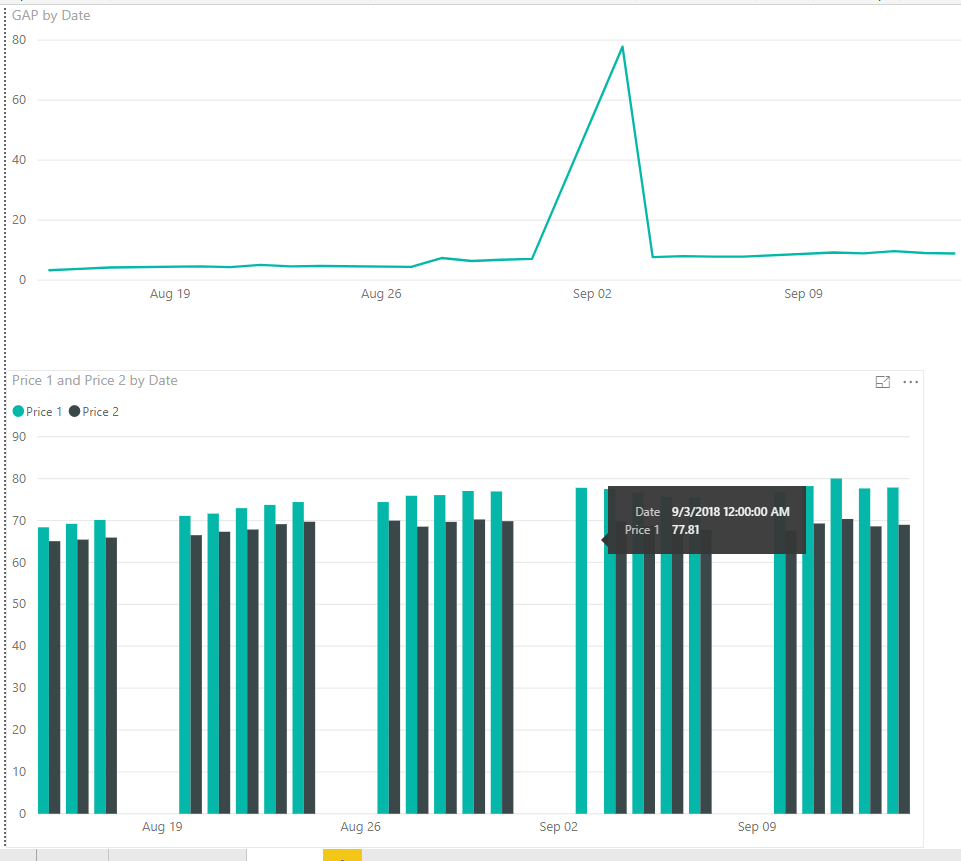
I am trying to compare the price of two different products across time, but on some dates I might not have price date for both products, so I want to exclude dates.  As you can see on the bottom of the picture, I didn't have both prices on September 3, so when I calculate to subtract those two numbers, it assumes that's a zero instead of omitting it.  


Here is my current calculation:


GAP = 'Daily Price 1'[$]-related('Daily Price 2'[$])


Price Comparison.png

1 ACCEPTED SOLUTION
mwegener
Most Valuable Professional

Hi,


with a if statement you can check if both prices exists.


GAP = IF( ISBLANK('Daily Price 1'[$]) || ISBLANK(RELATED('Daily Price 2'[$])), BLANK(), 'Daily Price 1'[$]-RELATED('Daily Price 2'[$]) )


The BLANK() GAP can be filtered on the visual level

Did I answer your question?
Please mark my post as solution, this will also help others.
Please give Kudos for support.

Marcus Wegener works as Full Stack Power BI Engineer at BI or DIE.
His mission is clear: "Get the most out of data, with Power BI."
twitter - LinkedIn - YouTube - website - podcast - Power BI Tutorials


View solution in original post

2 REPLIES 2
mwegener
Most Valuable Professional

Hi,


with a if statement you can check if both prices exists.


GAP = IF( ISBLANK('Daily Price 1'[$]) || ISBLANK(RELATED('Daily Price 2'[$])), BLANK(), 'Daily Price 1'[$]-RELATED('Daily Price 2'[$]) )


The BLANK() GAP can be filtered on the visual level

Did I answer your question?
Please mark my post as solution, this will also help others.
Please give Kudos for support.

Marcus Wegener works as Full Stack Power BI Engineer at BI or DIE.
His mission is clear: "Get the most out of data, with Power BI."
twitter - LinkedIn - YouTube - website - podcast - Power BI Tutorials


MattAllington
Community Champion
Community Champion

There is a visual level filter you can set to filter out zeros etc. 


* Matt is an 8 times Microsoft MVP (Power BI) and author of the Power BI Book Supercharge Power BI.
I will not give you bad advice, even if you unknowingly ask for it.

Helpful resources

Announcements
April Power BI Update Carousel

Power BI Monthly Update - April 2026

Check out the April 2026 Power BI update to learn about new features.

New to Fabric survey Carousel

New to Fabric Survey

If you have recently started exploring Fabric, we'd love to hear how it's going. Your feedback can help with product improvements.

Power BI DataViz World Championships carousel

Power BI DataViz World Championships - June 2026

A new Power BI DataViz World Championship is coming this June! Don't miss out on submitting your entry.

FabCon and SQLCon Highlights Carousel

FabCon &SQLCon Highlights

Experience the highlights from FabCon & SQLCon, available live and on-demand starting April 14th.