Join us at FabCon Atlanta from March 16 - 20, 2026, for the ultimate Fabric, Power BI, AI and SQL community-led event. Save $200 with code FABCOMM.
Register now!The Power BI Data Visualization World Championships is back! Get ahead of the game and start preparing now! Learn more
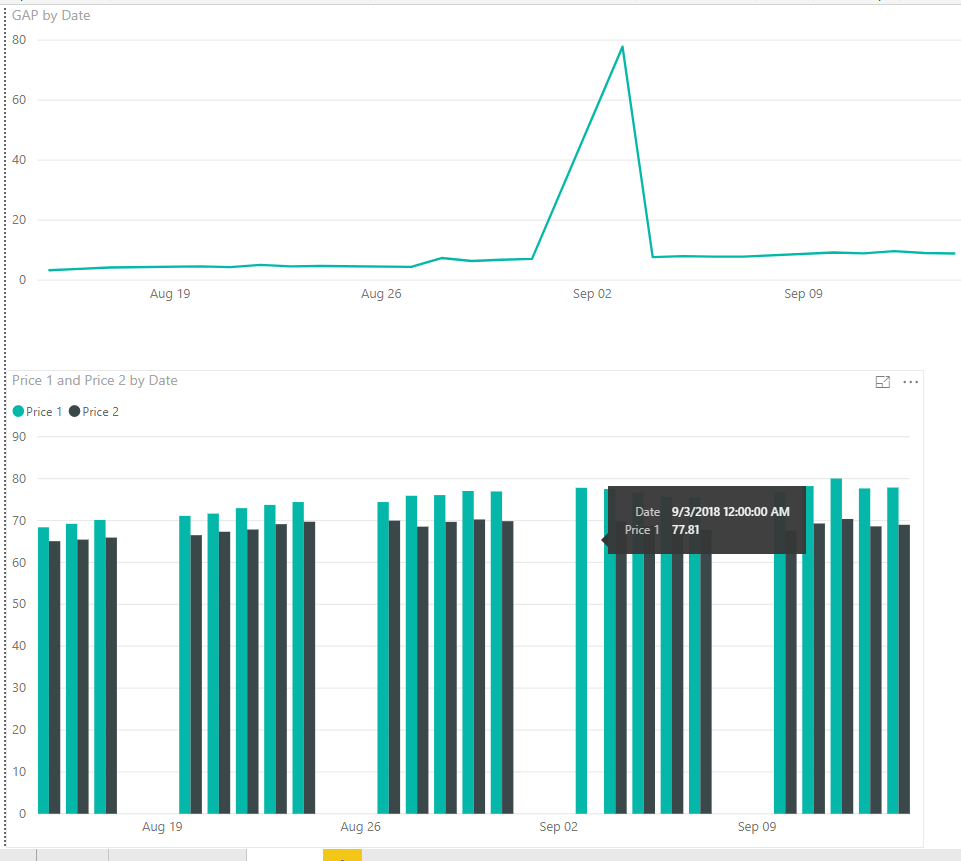
I am trying to compare the price of two different products across time, but on some dates I might not have price date for both products, so I want to exclude dates. As you can see on the bottom of the picture, I didn't have both prices on September 3, so when I calculate to subtract those two numbers, it assumes that's a zero instead of omitting it.
Here is my current calculation:
GAP = 'Daily Price 1'[$]-related('Daily Price 2'[$])
Solved! Go to Solution.
Hi,
with a if statement you can check if both prices exists.
GAP = IF( ISBLANK('Daily Price 1'[$]) || ISBLANK(RELATED('Daily Price 2'[$])), BLANK(), 'Daily Price 1'[$]-RELATED('Daily Price 2'[$]) )
The BLANK() GAP can be filtered on the visual level
Marcus Wegener works as Full Stack Power BI Engineer at BI or DIE.
His mission is clear: "Get the most out of data, with Power BI."
twitter - LinkedIn - YouTube - website - podcast - Power BI Tutorials
Hi,
with a if statement you can check if both prices exists.
GAP = IF( ISBLANK('Daily Price 1'[$]) || ISBLANK(RELATED('Daily Price 2'[$])), BLANK(), 'Daily Price 1'[$]-RELATED('Daily Price 2'[$]) )
The BLANK() GAP can be filtered on the visual level
Marcus Wegener works as Full Stack Power BI Engineer at BI or DIE.
His mission is clear: "Get the most out of data, with Power BI."
twitter - LinkedIn - YouTube - website - podcast - Power BI Tutorials
There is a visual level filter you can set to filter out zeros etc.
The Power BI Data Visualization World Championships is back! Get ahead of the game and start preparing now!
| User | Count |
|---|---|
| 40 | |
| 37 | |
| 33 | |
| 29 | |
| 27 |
| User | Count |
|---|---|
| 134 | |
| 104 | |
| 63 | |
| 60 | |
| 55 |