Join us at FabCon Atlanta from March 16 - 20, 2026, for the ultimate Fabric, Power BI, AI and SQL community-led event. Save $200 with code FABCOMM.
Register now!The Power BI Data Visualization World Championships is back! It's time to submit your entry. Live now!
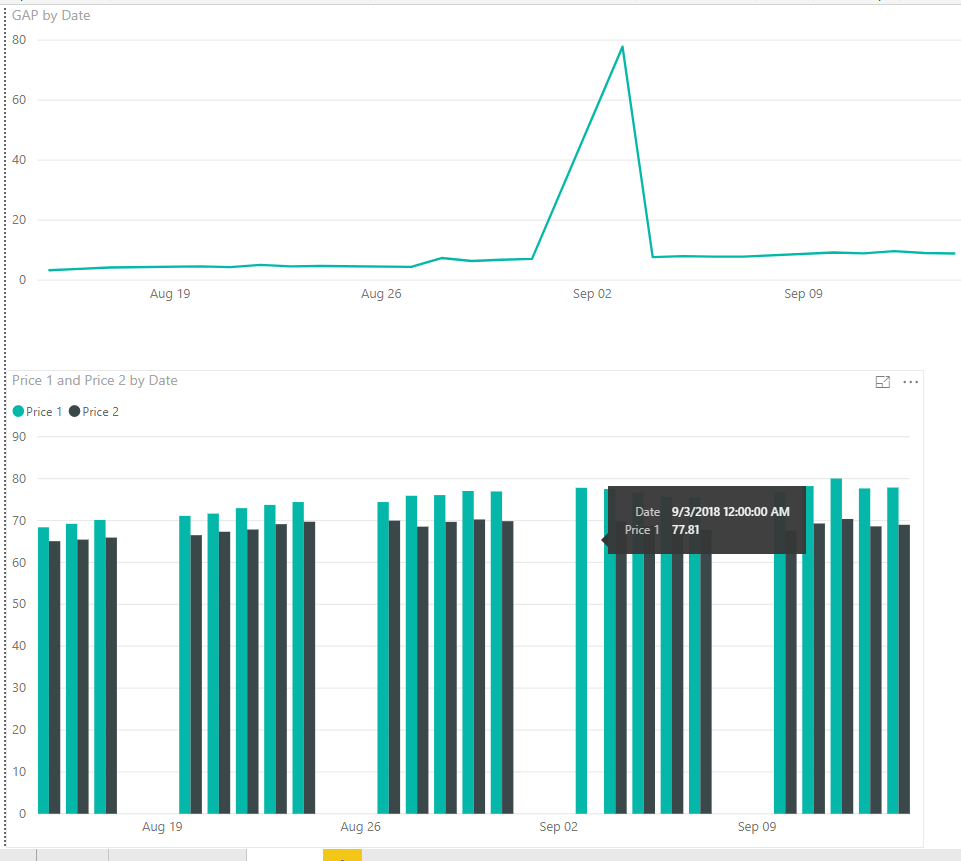
I am trying to compare the price of two different products across time, but on some dates I might not have price date for both products, so I want to exclude dates. As you can see on the bottom of the picture, I didn't have both prices on September 3, so when I calculate to subtract those two numbers, it assumes that's a zero instead of omitting it.
Here is my current calculation:
GAP = 'Daily Price 1'[$]-related('Daily Price 2'[$])
Solved! Go to Solution.
Hi,
with a if statement you can check if both prices exists.
GAP = IF( ISBLANK('Daily Price 1'[$]) || ISBLANK(RELATED('Daily Price 2'[$])), BLANK(), 'Daily Price 1'[$]-RELATED('Daily Price 2'[$]) )
The BLANK() GAP can be filtered on the visual level
Marcus Wegener works as Full Stack Power BI Engineer at BI or DIE.
His mission is clear: "Get the most out of data, with Power BI."
twitter - LinkedIn - YouTube - website - podcast - Power BI Tutorials
Hi,
with a if statement you can check if both prices exists.
GAP = IF( ISBLANK('Daily Price 1'[$]) || ISBLANK(RELATED('Daily Price 2'[$])), BLANK(), 'Daily Price 1'[$]-RELATED('Daily Price 2'[$]) )
The BLANK() GAP can be filtered on the visual level
Marcus Wegener works as Full Stack Power BI Engineer at BI or DIE.
His mission is clear: "Get the most out of data, with Power BI."
twitter - LinkedIn - YouTube - website - podcast - Power BI Tutorials
There is a visual level filter you can set to filter out zeros etc.
The Power BI Data Visualization World Championships is back! It's time to submit your entry.
Check out the January 2026 Power BI update to learn about new features.
| User | Count |
|---|---|
| 61 | |
| 49 | |
| 30 | |
| 25 | |
| 23 |
| User | Count |
|---|---|
| 128 | |
| 102 | |
| 56 | |
| 39 | |
| 31 |