Join us at FabCon Atlanta from March 16 - 20, 2026, for the ultimate Fabric, Power BI, AI and SQL community-led event. Save $200 with code FABCOMM.
Register now!Get Fabric Certified for FREE during Fabric Data Days. Don't miss your chance! Request now
Hi,
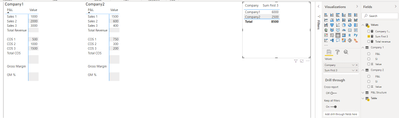
In the attached simplified example below, I'd like to create a measure which will always sum the first three row values in the table.
The current measure I've written is a calculate measure but uses the expression as the Company 1 values. This means it's specific to Company 1 so for Company 2 I'd have to duplicate it.
The new measure would ideally not require a specific company to be used in the measure expression to calculate the first three rows.
https://1drv.ms/u/s!Ajcv_9xvRfBd5ztQeRbRnFa5h1Am?e=mO0Ncf
Hope that makes sense.
Thanks for reading.
Solved! Go to Solution.
Hi, @smitpau
Based on your description, you may create a measure as below. The pbix file is attached in the end.
Sum First 3 =
SUMX(
SUMMARIZE(
'Table',
'Table'[Company],
"Result",
SWITCH(
[Company],
"Company1",
CALCULATE(
SUM('Company 1'[Value]),
FILTER(
ALL('Company 1'),
VALUE([SI])<4
)
),
"Company2",
CALCULATE(
SUM('Company 2'[Value]),
FILTER(
ALL('Company 2'),
VALUE([SI])<4
)
)
)
),
[Result]
)
Result:
Best Regards
Allan
If this post helps, then please consider Accept it as the solution to help the other members find it more quickly.
Hi, @smitpau
Based on your description, you may create a measure as below. The pbix file is attached in the end.
Sum First 3 =
SUMX(
SUMMARIZE(
'Table',
'Table'[Company],
"Result",
SWITCH(
[Company],
"Company1",
CALCULATE(
SUM('Company 1'[Value]),
FILTER(
ALL('Company 1'),
VALUE([SI])<4
)
),
"Company2",
CALCULATE(
SUM('Company 2'[Value]),
FILTER(
ALL('Company 2'),
VALUE([SI])<4
)
)
)
),
[Result]
)
Result:
Best Regards
Allan
If this post helps, then please consider Accept it as the solution to help the other members find it more quickly.
For each company sum up the values where [SI] is between 1 and 3.
Why do you have separate tables per company? You shoud combine the tables into one, either via DAX UNION() or better in Power Query.
Check out the November 2025 Power BI update to learn about new features.
Advance your Data & AI career with 50 days of live learning, contests, hands-on challenges, study groups & certifications and more!