cancel
Showing results for 
Search instead for 
Did you mean: 

Level up your Power BI skills this month - build one visual each week and tell better stories with data! Get started

Reply
M-M-P
Helper III
Helper III

Button with filter parameters

Hi All
I need your help to resolve this.

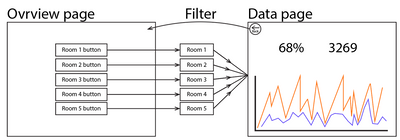
As you can see in the picture below, I have an Overview page and a Data page.
My wish is that when you click on a button, it switches to the Data page which is then filtered down to the data the button is selected to filter. So if you click on Room 3, then data from Room 3 will be displayed on the Data page.

Overview to data.png


Right now I have one page per room and it is very time consuming to maintain.


I have been working with page drilling through. But from a user perspective, this is not a path I want to take if I can avoid it.


Thanks in advance.

1 ACCEPTED SOLUTION
selimovd
Super User
Super User

Hey @M-M-P ,


drill through is the wrong tool for that.

Take a look at bookmarks, it's exactly what you need for your case:

Use bookmarks in Power BI Desktop to share insights and build stories - Power BI | Microsoft Docs


Or check it out in the Guy in a Cube video:

Mastering Power BI Bookmarks - YouTube


If you need any help please let me know.
If I answered your question I would be happy if you could mark my post as a solution ✔️ and give it a thumbs up 👍
 
Best regards
Denis
 

View solution in original post

3 REPLIES 3
selimovd
Super User
Super User

Hey @M-M-P ,


drill through is the wrong tool for that.

Take a look at bookmarks, it's exactly what you need for your case:

Use bookmarks in Power BI Desktop to share insights and build stories - Power BI | Microsoft Docs


Or check it out in the Guy in a Cube video:

Mastering Power BI Bookmarks - YouTube


If you need any help please let me know.
If I answered your question I would be happy if you could mark my post as a solution ✔️ and give it a thumbs up 👍
 
Best regards
Denis
 

Hi @selimovd 

Thanks for your reply 🙂

So, your solution is to have a bookmark per room?
It is definitely an easier solution to maintain.

Hey @M-M-P ,


exactly. Each button on the overview page is a bookmark to the data page with the pre defined slicers.

If you want you can then also add another bookmark on the data page that is bringing you back to the overview.


Let me know if that works for you.

If you need any help please let me know.
If I answered your question I would be happy if you could mark my post as a solution ✔️ and give it a thumbs up 👍
 
Best regards
Denis
 

Helpful resources

Announcements
April Power BI Update Carousel

Power BI Monthly Update - April 2026

Check out the April 2026 Power BI update to learn about new features.

Fabric SQL PBI Data Days

Data Days 2026 coming soon!

Sign up to receive a private message when registration opens and key events begin.

New to Fabric survey Carousel

New to Fabric Survey

If you have recently started exploring Fabric, we'd love to hear how it's going. Your feedback can help with product improvements.

Power BI DataViz World Championships carousel

Power BI DataViz World Championships - June 2026

A new Power BI DataViz World Championship is coming this June! Don't miss out on submitting your entry.