Get certified for free when you join Fabric Data Days 2026 and dive into Fabric, Power BI, SQL, AI, and other essential data skills.
Join nowJuly 28 - August 9 | Final Round of the Power BI Dataviz World Championships. This is your chance. Learn more
Hi All
I need your help to resolve this.
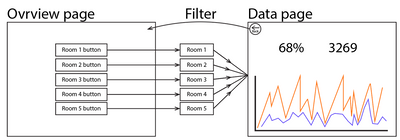
As you can see in the picture below, I have an Overview page and a Data page.
My wish is that when you click on a button, it switches to the Data page which is then filtered down to the data the button is selected to filter. So if you click on Room 3, then data from Room 3 will be displayed on the Data page.
Right now I have one page per room and it is very time consuming to maintain.
I have been working with page drilling through. But from a user perspective, this is not a path I want to take if I can avoid it.
Thanks in advance.
Solved! Go to Solution.
Hey @M-M-P ,
drill through is the wrong tool for that.
Take a look at bookmarks, it's exactly what you need for your case:
Use bookmarks in Power BI Desktop to share insights and build stories - Power BI | Microsoft Docs
Or check it out in the Guy in a Cube video:
Mastering Power BI Bookmarks - YouTube
Hey @M-M-P ,
drill through is the wrong tool for that.
Take a look at bookmarks, it's exactly what you need for your case:
Use bookmarks in Power BI Desktop to share insights and build stories - Power BI | Microsoft Docs
Or check it out in the Guy in a Cube video:
Mastering Power BI Bookmarks - YouTube
Hi @selimovd
Thanks for your reply 🙂
So, your solution is to have a bookmark per room?
It is definitely an easier solution to maintain.
Hey @M-M-P ,
exactly. Each button on the overview page is a bookmark to the data page with the pre defined slicers.
If you want you can then also add another bookmark on the data page that is bringing you back to the overview.
Let me know if that works for you.
Join us in Barcelona for FabCon and SQLCon, the Fabric, Power BI, SQL, and AI community event. Save €200 with code FABCMTY200.
If you love stickers, then you will definitely want to check out our community sticker challenge, Barcelona edition!
Check out the July 2026 Power BI update to learn about new features.
| User | Count |
|---|---|
| 30 | |
| 28 | |
| 22 | |
| 21 | |
| 19 |
| User | Count |
|---|---|
| 44 | |
| 31 | |
| 18 | |
| 18 | |
| 16 |