cancel
Showing results for 
Search instead for 
Did you mean: 

We've captured the moments from FabCon & SQLCon that everyone is talking about, and we are bringing them to the community, live and on-demand. Starts on April 14th. Register now

Reply
drrai66
Resolver I
Resolver I

Background Color Change based upon Value

Hello Experts

How can I Change the Background Color in the following MATRIX . I want the color to be GREEN for all "Compliant" and RED for "Not Applicable. Help Please.

Thanks

Deepak


Color.PNG

1 ACCEPTED SOLUTION
Greg_Deckler
Community Champion
Community Champion

Unfortunately, to the best of my knowledge, conditional formatting does not work on text columns/measures, only numeric.


One way that you might be able to achieve this would be to create a measure that returns 1 if "Compliant" and 0 if "Not Applicable". Create a matrix visualization setup the exact same way as your other matrix visualization except use this new measure as a replacement for your other matrix/column. Now, make the Value text size as small as possible. Place this matrix exactly behind your original matrix. Make sure that your original matrix has transparency set to something other than 0%.


Hacky, but that's the best thing I can think of.


When you are all done, go vote for this Idea: https://ideas.powerbi.com/forums/265200-power-bi-ideas/suggestions/32184037-conditional-formatting-f...


I just did.


Follow on LinkedIn
@ me in replies or I'll lose your thread!!!
Instead of a Kudo, please vote for this idea
Become an expert!: Enterprise DNA
External Tools: MSHGQM
YouTube Channel!: Microsoft Hates Greg
Latest book!:
DAX For Humans

DAX is easy, CALCULATE makes DAX hard...

View solution in original post

4 REPLIES 4
Esabee
Frequent Visitor

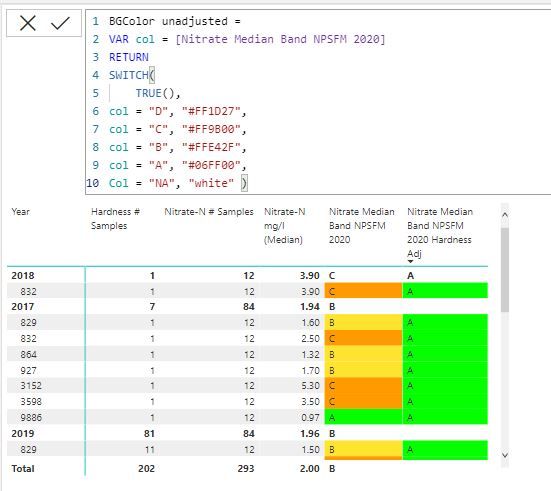
I may have misunderstood, or maybe Power BI has been udpated to allow conditional formatting of matrix cell background colour based on text values, but I have had success with creating a simple measure based on a single text value (A-D). I thought this

might be worth capturing here


BGColourText.JPG

Anonymous
Not applicable
Greg_Deckler
Community Champion
Community Champion

Unfortunately, to the best of my knowledge, conditional formatting does not work on text columns/measures, only numeric.


One way that you might be able to achieve this would be to create a measure that returns 1 if "Compliant" and 0 if "Not Applicable". Create a matrix visualization setup the exact same way as your other matrix visualization except use this new measure as a replacement for your other matrix/column. Now, make the Value text size as small as possible. Place this matrix exactly behind your original matrix. Make sure that your original matrix has transparency set to something other than 0%.


Hacky, but that's the best thing I can think of.


When you are all done, go vote for this Idea: https://ideas.powerbi.com/forums/265200-power-bi-ideas/suggestions/32184037-conditional-formatting-f...


I just did.


Follow on LinkedIn
@ me in replies or I'll lose your thread!!!
Instead of a Kudo, please vote for this idea
Become an expert!: Enterprise DNA
External Tools: MSHGQM
YouTube Channel!: Microsoft Hates Greg
Latest book!:
DAX For Humans

DAX is easy, CALCULATE makes DAX hard...

It Worked Perfectly!!!

Thanks

Deepak

Helpful resources

Announcements
New to Fabric survey Carousel

New to Fabric Survey

If you have recently started exploring Fabric, we'd love to hear how it's going. Your feedback can help with product improvements.

Power BI DataViz World Championships carousel

Power BI DataViz World Championships - June 2026

A new Power BI DataViz World Championship is coming this June! Don't miss out on submitting your entry.

Join our Fabric User Panel

Join our Fabric User Panel

Share feedback directly with Fabric product managers, participate in targeted research studies and influence the Fabric roadmap.

March Power BI Update Carousel

Power BI Community Update - March 2026

Check out the March 2026 Power BI update to learn about new features.