Don't miss your chance to take the Fabric Data Engineer (DP-600) exam for FREE! Find out how by attending the DP-600 session on April 23rd (pacific time), live or on-demand.
Learn moreNext up in the FabCon + SQLCon recap series: The roadmap for Microsoft SQL and Maximizing Developer experiences in Fabric. All sessions are available on-demand after the live show. Register now
Hello Experts
How can I Change the Background Color in the following MATRIX . I want the color to be GREEN for all "Compliant" and RED for "Not Applicable. Help Please.
Thanks
Deepak
Solved! Go to Solution.
Unfortunately, to the best of my knowledge, conditional formatting does not work on text columns/measures, only numeric.
One way that you might be able to achieve this would be to create a measure that returns 1 if "Compliant" and 0 if "Not Applicable". Create a matrix visualization setup the exact same way as your other matrix visualization except use this new measure as a replacement for your other matrix/column. Now, make the Value text size as small as possible. Place this matrix exactly behind your original matrix. Make sure that your original matrix has transparency set to something other than 0%.
Hacky, but that's the best thing I can think of.
When you are all done, go vote for this Idea: https://ideas.powerbi.com/forums/265200-power-bi-ideas/suggestions/32184037-conditional-formatting-f...
I just did.
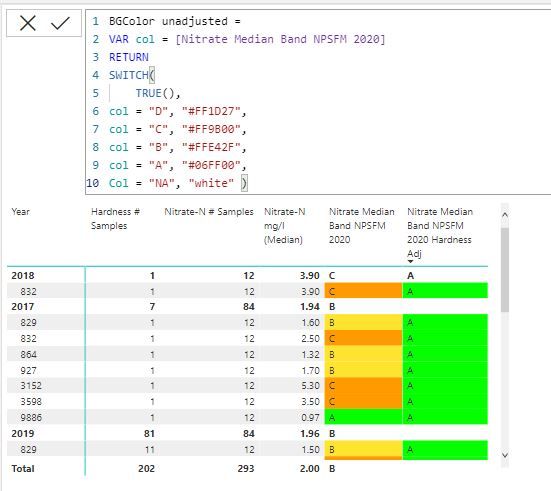
I may have misunderstood, or maybe Power BI has been udpated to allow conditional formatting of matrix cell background colour based on text values, but I have had success with creating a simple measure based on a single text value (A-D). I thought this
might be worth capturing here
Unfortunately, to the best of my knowledge, conditional formatting does not work on text columns/measures, only numeric.
One way that you might be able to achieve this would be to create a measure that returns 1 if "Compliant" and 0 if "Not Applicable". Create a matrix visualization setup the exact same way as your other matrix visualization except use this new measure as a replacement for your other matrix/column. Now, make the Value text size as small as possible. Place this matrix exactly behind your original matrix. Make sure that your original matrix has transparency set to something other than 0%.
Hacky, but that's the best thing I can think of.
When you are all done, go vote for this Idea: https://ideas.powerbi.com/forums/265200-power-bi-ideas/suggestions/32184037-conditional-formatting-f...
I just did.
It Worked Perfectly!!!
Thanks
Deepak
If you have recently started exploring Fabric, we'd love to hear how it's going. Your feedback can help with product improvements.
A new Power BI DataViz World Championship is coming this June! Don't miss out on submitting your entry.
Share feedback directly with Fabric product managers, participate in targeted research studies and influence the Fabric roadmap.
| User | Count |
|---|---|
| 44 | |
| 43 | |
| 38 | |
| 18 | |
| 16 |
| User | Count |
|---|---|
| 67 | |
| 63 | |
| 30 | |
| 30 | |
| 23 |