Join us at FabCon Atlanta from March 16 - 20, 2026, for the ultimate Fabric, Power BI, AI and SQL community-led event. Save $200 with code FABCOMM.
Register now!Learn from the best! Meet the four finalists headed to the FINALS of the Power BI Dataviz World Championships! Register now
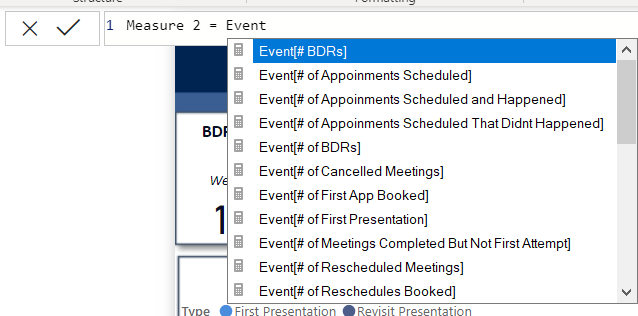
With the new update to Power Bi, when I go to create a measure, the formula is no longer auto referencing tables available to me. See screenshot. I believe there was a setting to turn this on.
Solved! Go to Solution.
Try using a single quote ( ' )
And I don't see that problem. Your issue I believe is that you need to start with an aggregation before referencing a table/column because you are creating a measure.
Try using a single quote ( ' )
And I don't see that problem. Your issue I believe is that you need to start with an aggregation before referencing a table/column because you are creating a measure.
Share feedback directly with Fabric product managers, participate in targeted research studies and influence the Fabric roadmap.
Check out the February 2026 Power BI update to learn about new features.
| User | Count |
|---|---|
| 61 | |
| 59 | |
| 42 | |
| 18 | |
| 15 |
| User | Count |
|---|---|
| 108 | |
| 100 | |
| 39 | |
| 29 | |
| 29 |