Join us at FabCon Atlanta from March 16 - 20, 2026, for the ultimate Fabric, Power BI, AI and SQL community-led event. Save $200 with code FABCOMM.
Register now!The Power BI Data Visualization World Championships is back! Get ahead of the game and start preparing now! Learn more
Hi,
In the case of a sale in the amount of U $ 1000.00, it was received in two times of U $ 500.00. The information is generated in the table of the SQL database, as shown:
| ID | Sale Value | Received |
| 1 | 1.000,00 | 500,00 |
| 1 | 1.000,00 | 500,00 |
| 2 | 450,00 | 225,00 |
| 2 | 450,00 | 225,00 |
| Total | 1.450,00 | 1.450,00 |
I need the sum to be performed by a single ID as to the value of the sale and total as to the receipts. I made a few attempts with MAX, but there are problems in the graphics and sums, because it only generates the maximum value.
I need a lot of help.
Thank you.
Solved! Go to Solution.
Hi Gelain,
have you tried with the FIRSTNONBLANK function:
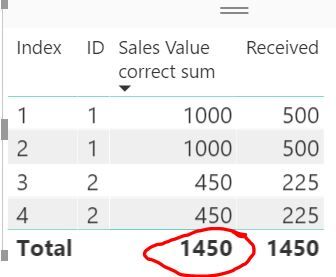
Sales Value correct sum = SUMX(DISTINCT(Data[ID]), FIRSTNONBLANK(Data[Sales Value], 0))
I got the correct total:
more details:
https://stackoverflow.com/questions/43547620/sum-distinct-values-for-first-occurance-in-power-bi
You could use the following measure as well.
Measure = SUMX ( VALUES ( Table1[ID] ), CALCULATE ( MAX ( Table1[Sale Value] ) ) )
Hi Gelain,
have you tried with the FIRSTNONBLANK function:
Sales Value correct sum = SUMX(DISTINCT(Data[ID]), FIRSTNONBLANK(Data[Sales Value], 0))
I got the correct total:
more details:
https://stackoverflow.com/questions/43547620/sum-distinct-values-for-first-occurance-in-power-bi
Thank you. Helped me a lot.
The Power BI Data Visualization World Championships is back! Get ahead of the game and start preparing now!
| User | Count |
|---|---|
| 38 | |
| 36 | |
| 33 | |
| 33 | |
| 29 |
| User | Count |
|---|---|
| 134 | |
| 96 | |
| 78 | |
| 67 | |
| 65 |