Join us at FabCon Atlanta from March 16 - 20, 2026, for the ultimate Fabric, Power BI, AI and SQL community-led event. Save $200 with code FABCOMM.
Register now!Vote for your favorite vizzies from the Power BI Dataviz World Championship submissions. Vote now!
Hi,
In the case of a sale in the amount of U $ 1000.00, it was received in two times of U $ 500.00. The information is generated in the table of the SQL database, as shown:
| ID | Sale Value | Received |
| 1 | 1.000,00 | 500,00 |
| 1 | 1.000,00 | 500,00 |
| 2 | 450,00 | 225,00 |
| 2 | 450,00 | 225,00 |
| Total | 1.450,00 | 1.450,00 |
I need the sum to be performed by a single ID as to the value of the sale and total as to the receipts. I made a few attempts with MAX, but there are problems in the graphics and sums, because it only generates the maximum value.
I need a lot of help.
Thank you.
Solved! Go to Solution.
Hi Gelain,
have you tried with the FIRSTNONBLANK function:
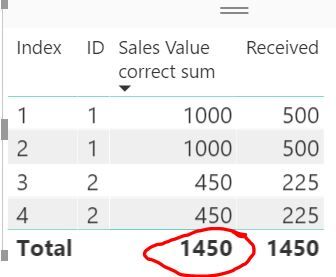
Sales Value correct sum = SUMX(DISTINCT(Data[ID]), FIRSTNONBLANK(Data[Sales Value], 0))
I got the correct total:
more details:
https://stackoverflow.com/questions/43547620/sum-distinct-values-for-first-occurance-in-power-bi
You could use the following measure as well.
Measure = SUMX ( VALUES ( Table1[ID] ), CALCULATE ( MAX ( Table1[Sale Value] ) ) )
Hi Gelain,
have you tried with the FIRSTNONBLANK function:
Sales Value correct sum = SUMX(DISTINCT(Data[ID]), FIRSTNONBLANK(Data[Sales Value], 0))
I got the correct total:
more details:
https://stackoverflow.com/questions/43547620/sum-distinct-values-for-first-occurance-in-power-bi
Thank you. Helped me a lot.
Vote for your favorite vizzies from the Power BI World Championship submissions!
If you love stickers, then you will definitely want to check out our Community Sticker Challenge!
Check out the January 2026 Power BI update to learn about new features.
| User | Count |
|---|---|
| 57 | |
| 55 | |
| 42 | |
| 16 | |
| 16 |
| User | Count |
|---|---|
| 113 | |
| 106 | |
| 38 | |
| 35 | |
| 26 |