This time we’re going bigger than ever. Fabric, Power BI, SQL, AI and more. We're covering it all. You won't want to miss it.
Learn moreLevel up your Power BI skills this month - build one visual each week and tell better stories with data! Get started
Hi,
In the case of a sale in the amount of U $ 1000.00, it was received in two times of U $ 500.00. The information is generated in the table of the SQL database, as shown:
| ID | Sale Value | Received |
| 1 | 1.000,00 | 500,00 |
| 1 | 1.000,00 | 500,00 |
| 2 | 450,00 | 225,00 |
| 2 | 450,00 | 225,00 |
| Total | 1.450,00 | 1.450,00 |
I need the sum to be performed by a single ID as to the value of the sale and total as to the receipts. I made a few attempts with MAX, but there are problems in the graphics and sums, because it only generates the maximum value.
I need a lot of help.
Thank you.
Solved! Go to Solution.
Hi Gelain,
have you tried with the FIRSTNONBLANK function:
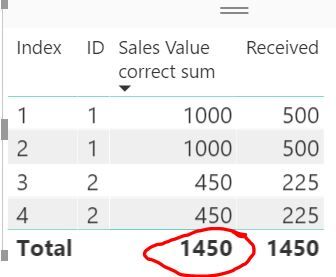
Sales Value correct sum = SUMX(DISTINCT(Data[ID]), FIRSTNONBLANK(Data[Sales Value], 0))
I got the correct total:
more details:
https://stackoverflow.com/questions/43547620/sum-distinct-values-for-first-occurance-in-power-bi
You could use the following measure as well.
Measure = SUMX ( VALUES ( Table1[ID] ), CALCULATE ( MAX ( Table1[Sale Value] ) ) )
Hi Gelain,
have you tried with the FIRSTNONBLANK function:
Sales Value correct sum = SUMX(DISTINCT(Data[ID]), FIRSTNONBLANK(Data[Sales Value], 0))
I got the correct total:
more details:
https://stackoverflow.com/questions/43547620/sum-distinct-values-for-first-occurance-in-power-bi
Thank you. Helped me a lot.
Check out the April 2026 Power BI update to learn about new features.
Sign up to receive a private message when registration opens and key events begin.
If you have recently started exploring Fabric, we'd love to hear how it's going. Your feedback can help with product improvements.
| User | Count |
|---|---|
| 36 | |
| 33 | |
| 27 | |
| 24 | |
| 18 |
| User | Count |
|---|---|
| 66 | |
| 50 | |
| 33 | |
| 24 | |
| 24 |