Don't miss your chance to take the Fabric Data Engineer (DP-700) exam on us!
Learn moreNext up in the FabCon + SQLCon recap series: The roadmap for Microsoft SQL and Maximizing Developer experiences in Fabric. All sessions are available on-demand after the live show. Register now
Is possible for one segmentation filter to have options excluded or filtered from another segmentation filter?
Example:
1º segmentation filter
[x]A - [ ]B - [ ]C
2º segmentation filter
[disable]A - [x]B - [ ]C
3º segmentation filter
[disable]A - [disable]B - [x]C
Solved! Go to Solution.
Hi @Arthurfrc ,
Please try:
First create tree tables for slicers:
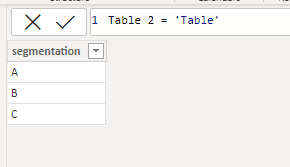
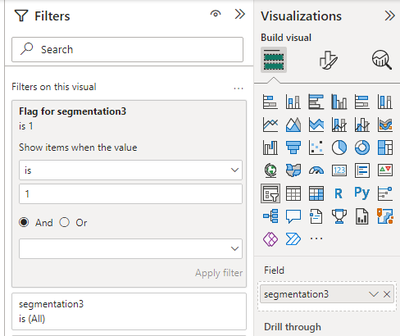
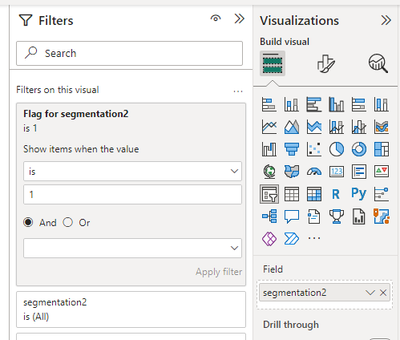
Then apply measure [Flag for segmentation2] to segmentation2, [Flag for segmentation3] to segmentation3:
Flag for segmentation2 =
VAR _a =
SELECTCOLUMNS ( 'Table', "1", [segmentation] )
RETURN
IF (
ISFILTERED ( 'Table'[segmentation] )
&& MAX ( 'Table 2'[segmentation] ) IN _a,
0,
1
)
Flag for segmentation3 =
VAR _a =
SELECTCOLUMNS ( 'Table', "1", [segmentation] )
VAR _b =
SELECTCOLUMNS ( 'Table 2', "2", [segmentation] )
RETURN
SWITCH (
TRUE (),
ISFILTERED ( 'Table'[segmentation] ) && ISFILTERED ( 'Table 2'[segmentation] )
&& MAX ( 'Table 3'[segmentation] ) IN UNION ( _a, _b ), 0,
ISFILTERED ( 'Table'[segmentation] )
&& NOT ( ISFILTERED ( 'Table 2'[segmentation] ) )
&& MAX ( 'Table 3'[segmentation] ) IN _a, 0,
NOT ( ISFILTERED ( 'Table'[segmentation] ) )
&& ISFILTERED ( 'Table 2'[segmentation] )
&& MAX ( 'Table 3'[segmentation] ) IN _b, 0,
1
)
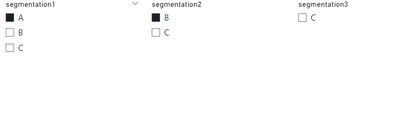
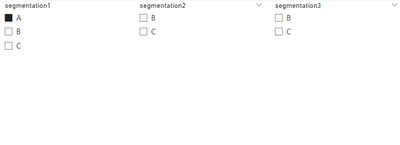
Final output:
Best Regards,
Jianbo Li
If this post helps, then please consider Accept it as the solution to help the other members find it more quickly.
Hi @Arthurfrc ,
This cannot be achieved using just one table, because when you use only one table, the three slicers you create cannot be selected independently without being affected.
Best Regards,
Jianbo Li
If this post helps, then please consider Accept it as the solution to help the other members find it more quickly.
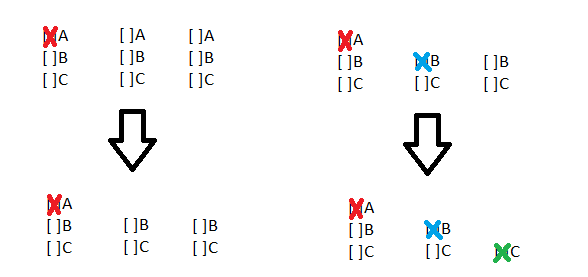
I wanna try something with my noob drawing in paint.
'A, B and C' are options in my segmentation 1,
each time I choose one of them , in next segmentations (2 & 3)
this option need to disappear.
Now this did any sense?😅
Hi @Arthurfrc ,
Please try:
First create tree tables for slicers:
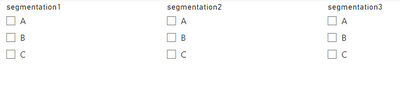
Then apply measure [Flag for segmentation2] to segmentation2, [Flag for segmentation3] to segmentation3:
Flag for segmentation2 =
VAR _a =
SELECTCOLUMNS ( 'Table', "1", [segmentation] )
RETURN
IF (
ISFILTERED ( 'Table'[segmentation] )
&& MAX ( 'Table 2'[segmentation] ) IN _a,
0,
1
)
Flag for segmentation3 =
VAR _a =
SELECTCOLUMNS ( 'Table', "1", [segmentation] )
VAR _b =
SELECTCOLUMNS ( 'Table 2', "2", [segmentation] )
RETURN
SWITCH (
TRUE (),
ISFILTERED ( 'Table'[segmentation] ) && ISFILTERED ( 'Table 2'[segmentation] )
&& MAX ( 'Table 3'[segmentation] ) IN UNION ( _a, _b ), 0,
ISFILTERED ( 'Table'[segmentation] )
&& NOT ( ISFILTERED ( 'Table 2'[segmentation] ) )
&& MAX ( 'Table 3'[segmentation] ) IN _a, 0,
NOT ( ISFILTERED ( 'Table'[segmentation] ) )
&& ISFILTERED ( 'Table 2'[segmentation] )
&& MAX ( 'Table 3'[segmentation] ) IN _b, 0,
1
)
Final output:
Best Regards,
Jianbo Li
If this post helps, then please consider Accept it as the solution to help the other members find it more quickly.
Great, thanks, it is what I was searching to my BI.
Just for curiosity... does this work with just one table or do I really need to copy the table to as many different options as I need??
Hi @Arthurfrc ,
Sorry for that the information you have provided is not making the problem clear to me. Can you please share more details to help us clarify your scenario?
Please provide me with more details about your table and your problem or share me with your pbix file after removing sensitive data.
Refer to:
How to provide sample data in the Power BI Forum
How to Get Your Question Answered Quickly
Best Regards,
Jianbo Li
If this post helps, then please consider Accept it as the solution to help the other members find it more quickly.
If you have recently started exploring Fabric, we'd love to hear how it's going. Your feedback can help with product improvements.
A new Power BI DataViz World Championship is coming this June! Don't miss out on submitting your entry.
Share feedback directly with Fabric product managers, participate in targeted research studies and influence the Fabric roadmap.
| User | Count |
|---|---|
| 9 | |
| 6 | |
| 3 | |
| 2 | |
| 1 |
| User | Count |
|---|---|
| 21 | |
| 14 | |
| 11 | |
| 6 | |
| 5 |