Join us at FabCon Atlanta from March 16 - 20, 2026, for the ultimate Fabric, Power BI, AI and SQL community-led event. Save $200 with code FABCOMM.
Register now!The Power BI Data Visualization World Championships is back! It's time to submit your entry. Live now!
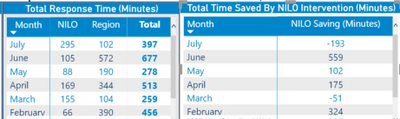
Hi @Grizzlydad ,
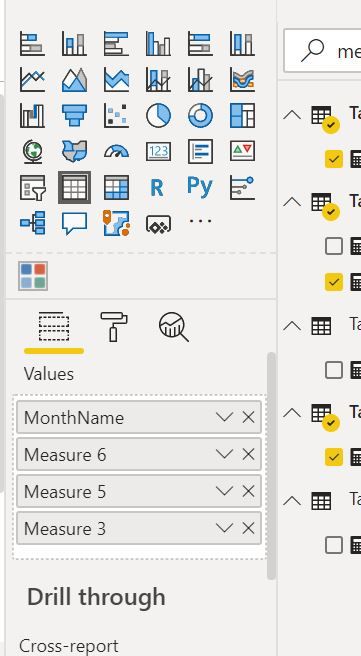
Try Troubleshooting your measures
Create Measures
Measure 1 Region = CALCULATE ( SUM ( Tbl_NationalRawData[Minutes Taken To Respond]), Tbl_NationalRawData[Region Responded]= "REGION" )
Measure2 NILO = CALCULATE ( SUM ( Tbl_NationalRawData[Minutes Taken To Respond]), Tbl_NationalRawData[NILO Responded]= "NILO" )
Difference = Measure 1 Region - Measure2 NILO
See what values are returned by all these 3 measures separately.
Regards,
Harsh Nathani
Did I answer your question? Mark my post as a solution! Appreciate with a Kudos!! (Click the Thumbs Up Button)
Hi @Grizzlydad ,
Have you created these measures.
Not against the Month Column in the Visualization Pane, what is the value of thes measures.
Regards,
Harsh Nathani
Did I answer your question? Mark my post as a solution! Appreciate with a Kudos!! (Click the Thumbs Up Button)
Hi @Grizzlydad ,
Try modifying your DAX expression as follows:
NILO Saving (Minutes) = CALCULATE ( SUM ( Tbl_NationalRawData[Minutes Taken To Respond]), FILTER(ALLSELECTED(Tbl_NationalRaw), Tbl_NationalRawData[Region Responded]= "REGION" )) -
CALCULATE ( SUM ( Tbl_NationalRawData[Minutes Taken To Respond]), FILTER(ALLSELECTED(Tbl_NationalRaw), Tbl_NationalRawData[NILO Responded]= "NILO" ))
Thanks,
Pragati
Hi thanks, that has made each month have the same total now which is the total minutes saved year to date, not individual month totals.
| User | Count |
|---|---|
| 7 | |
| 5 | |
| 5 | |
| 3 | |
| 3 |
| User | Count |
|---|---|
| 15 | |
| 14 | |
| 9 | |
| 8 | |
| 7 |