Get certified for free when you join Fabric Data Days 2026 and dive into Fabric, Power BI, SQL, AI, and other essential data skills.
Join nowData Days is here! Join us now for 60+ days of learning, challenges, and connection. Learn more
Hi @Grizzlydad ,
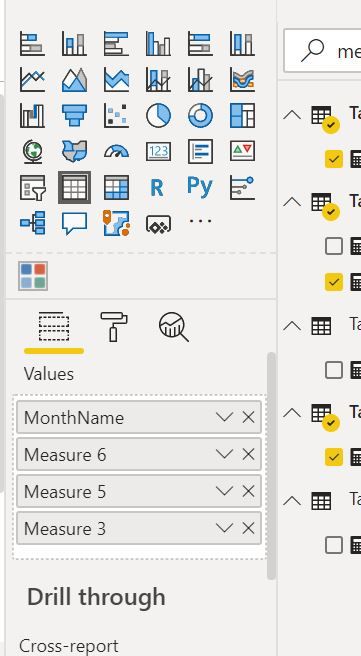
Try Troubleshooting your measures
Create Measures
Measure 1 Region = CALCULATE ( SUM ( Tbl_NationalRawData[Minutes Taken To Respond]), Tbl_NationalRawData[Region Responded]= "REGION" )
Measure2 NILO = CALCULATE ( SUM ( Tbl_NationalRawData[Minutes Taken To Respond]), Tbl_NationalRawData[NILO Responded]= "NILO" )
Difference = Measure 1 Region - Measure2 NILO
See what values are returned by all these 3 measures separately.
Regards,
Harsh Nathani
Did I answer your question? Mark my post as a solution! Appreciate with a Kudos!! (Click the Thumbs Up Button)
Hi @Grizzlydad ,
Have you created these measures.
Not against the Month Column in the Visualization Pane, what is the value of thes measures.
Regards,
Harsh Nathani
Did I answer your question? Mark my post as a solution! Appreciate with a Kudos!! (Click the Thumbs Up Button)
Hi @Grizzlydad ,
Try modifying your DAX expression as follows:
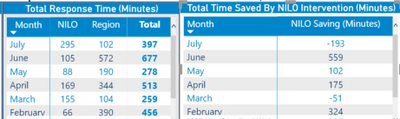
NILO Saving (Minutes) = CALCULATE ( SUM ( Tbl_NationalRawData[Minutes Taken To Respond]), FILTER(ALLSELECTED(Tbl_NationalRaw), Tbl_NationalRawData[Region Responded]= "REGION" )) -
CALCULATE ( SUM ( Tbl_NationalRawData[Minutes Taken To Respond]), FILTER(ALLSELECTED(Tbl_NationalRaw), Tbl_NationalRawData[NILO Responded]= "NILO" ))
Thanks,
Pragati
Hi thanks, that has made each month have the same total now which is the total minutes saved year to date, not individual month totals.
Don't miss out on Data Days, June 15 through August 7. Learn Fabric, Power BI, SQL, AI and more.
Check out the May 2026 Power BI update to learn about new features.
| User | Count |
|---|---|
| 3 | |
| 2 | |
| 2 | |
| 1 | |
| 1 |