Get Fabric or SQL Certified for Free.
Get certified for free when you join Fabric Data Days 2026 and dive into Fabric, Power BI, SQL, AI, and other essential data skills.
Join now- Power BI forums
- Get Help with Power BI
- Desktop
- Service
- Report Server
- Power Query
- Mobile Apps
- Developer
- DAX Commands and Tips
- Custom Visuals Development Discussion
- Health and Life Sciences
- Power BI Spanish forums
- Translated Spanish Desktop
- Training and Consulting
- Instructor Led Training
- Dashboard in a Day for Women, by Women
- Galleries
- Data Stories Gallery
- Themes Gallery
- Contests Gallery
- QuickViz Gallery
- Quick Measures Gallery
- Visual Calculations Gallery
- Fabric Apps Gallery
- Notebook Gallery
- Translytical Task Flow Gallery
- TMDL Gallery
- R Script Showcase
- Webinars and Video Gallery
- Ideas
- Custom Visuals Ideas (read-only)
- Issues
- Issues
- Events
- Upcoming Events
July 7 - July 17 | Round 2 of the Power BI Dataviz World Championships. Don't miss your chance! Learn more
- Power BI forums
- Forums
- Get Help with Power BI
- Custom Visuals Development Discussion
- Re: Power BI Custom Visuals' Community
- Subscribe to RSS Feed
- Mark Topic as New
- Mark Topic as Read
- Float this Topic for Current User
- Bookmark
- Subscribe
- Printer Friendly Page

- Mark as New
- Bookmark
- Subscribe
- Mute
- Subscribe to RSS Feed
- Permalink
- Report Inappropriate Content
Power BI Custom Visuals' Community
Welcome to Power BI Custom Visuals Community!
Power BI custom visuals is all about community. We are very excited to announce that custom visuals now have a special place in the Power BI community site, to share knowledge, ideas and news!
- Custom visuals development discussion – Ask questions and share knowledge about developing custom visuals.
- Custom visuals ideas – Share your ideas, ask for features, propose new custom visuals.
- Custom visuals community blog – Community news and announcements for new custom visuals available, new APIs released, tips & tricks from developers and users.
Power BI custom visuals useful links for developers
- Developer documents - find here all documents you need
- Step-by-step tutorial
- Looking for advanced tutorial? Find it here
- Visit also our github
- Find here Power BI visuals' Samples
- Custom visual's webinar
- For technichal questions and help please reach out [email protected]


- Mark as New
- Bookmark
- Subscribe
- Mute
- Subscribe to RSS Feed
- Permalink
- Report Inappropriate Content
Hi,
We will consider this changes in the next visual release but there isn't any ETA for a while.
Kind Regards,
Evgenii Elkin,
Software Engineer
Microsoft Power BI Custom Visuals
[email protected]
- Mark as New
- Bookmark
- Subscribe
- Mute
- Subscribe to RSS Feed
- Permalink
- Report Inappropriate Content
The Timeline Slicer took me here for it's support URL: https://appsource.microsoft.com/en-us/product/power-bi-visuals/WA104380786?src=office&tab=Overview
I have a problem with this visual, when publish to Report Server (Sept 2019 edition) when viewing this visual on the report server Chrome/Edge/Firefox on multiple PC's that I've tested. The visual does not filter the data, it does work in PowerBI Desktop, but not when it's published.
I need to use this Microsoft Visual addon, where do I go to get support?
- Mark as New
- Bookmark
- Subscribe
- Mute
- Subscribe to RSS Feed
- Permalink
- Report Inappropriate Content


- Mark as New
- Bookmark
- Subscribe
- Mute
- Subscribe to RSS Feed
- Permalink
- Report Inappropriate Content
Hi,
On powerbi.microsoft.com/en-us/custom-visuals I read that Microsoft finally has decided to share the source code of all the visuals that ship with Power BI:
"We want you to be ready to extend Power BI. So we've provided the source code for all the visuals we ship in Power BI. You can quickly create high quality custom visuals for Power BI."
I checked github but cannot find a complete repository of the source codes.
Could someone please tell me the location of the source code of e.g. the 'matrix' and 'scatter chart' visual?
Thank you,
Martijn
- Mark as New
- Bookmark
- Subscribe
- Mute
- Subscribe to RSS Feed
- Permalink
- Report Inappropriate Content
Hi Martijn,
This landing page is temporary and contains obsolete info.
We will update it soon.
The source code for core visuals is private, hovever, we have got a collection of visuals with open source code. You can find them on that page.
Kind Regards,
Evgenii Elkin,
Software Engineer
Microsoft Power BI Custom Visuals
[email protected]

- Mark as New
- Bookmark
- Subscribe
- Mute
- Subscribe to RSS Feed
- Permalink
- Report Inappropriate Content
Hello!
Im using the enhanced scatter chart and I want to place a background on it, when clicking on the option backdrop, no place for the hyperlink appears. Only a revert to original button appears that when selecting it only turns off the backdrop option. HELP PLEASE


- Mark as New
- Bookmark
- Subscribe
- Mute
- Subscribe to RSS Feed
- Permalink
- Report Inappropriate Content
How can one find the visualName of a custom visual for JSON editing if the format painter is insufficient?
- Mark as New
- Bookmark
- Subscribe
- Mute
- Subscribe to RSS Feed
- Permalink
- Report Inappropriate Content
Hello,
Your question is unclear.
Please, describe it with more details and create a separate topic for this.
Kind Regards,
Evgenii Elkin,
Software Engineer
Microsoft Power BI Custom Visuals
[email protected]
- Mark as New
- Bookmark
- Subscribe
- Mute
- Subscribe to RSS Feed
- Permalink
- Report Inappropriate Content
Hello,
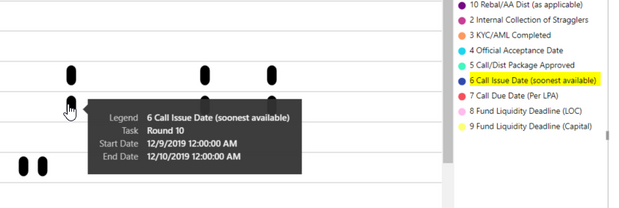
I am creating a Gantt Chart, but for some reason some events are show up black when the Legend does not black to label any events. Does anyone know why they are back and how to get the event to show the correct color according to the legend.
Below is a screen shot.
For Example: according to the legend this event should be blue:
Thanks in advanced.
- Mark as New
- Bookmark
- Subscribe
- Mute
- Subscribe to RSS Feed
- Permalink
- Report Inappropriate Content
check if your date field is of type date/time
- Mark as New
- Bookmark
- Subscribe
- Mute
- Subscribe to RSS Feed
- Permalink
- Report Inappropriate Content
Hi,
I am looking for a way to exclude individual data points from the Enhanced Scatter plot. In the standard Scatter Chart in Power BI desktop, this can be done by right clicking on a data point. Unfortunately, this cannot be done in the Enahce Scatter.
Thanks in advance for your suggestions.
- Mark as New
- Bookmark
- Subscribe
- Mute
- Subscribe to RSS Feed
- Permalink
- Report Inappropriate Content
Hi,
Please, create a separate topic and provide detailed inforamtion regarding your issue, screenshots are preferable.
Kind Regards,
Evgenii Elkin,
Software Engineer
Microsoft Power BI Custom Visuals
[email protected]
- Mark as New
- Bookmark
- Subscribe
- Mute
- Subscribe to RSS Feed
- Permalink
- Report Inappropriate Content
Goodmorning all,
i have upate the new gnatt 2.0.0. in my power bi desktop report. I need the documentaion for the correct use...
Than's for help
fabio
- Mark as New
- Bookmark
- Subscribe
- Mute
- Subscribe to RSS Feed
- Permalink
- Report Inappropriate Content
I noticed the update as well:
1) Milestone feature
2) Rounded bars
3) Lines between category labels
Does anyone have any experience with this? Is this an update or is it glitching? Need some help as well. Thank you.
- Mark as New
- Bookmark
- Subscribe
- Mute
- Subscribe to RSS Feed
- Permalink
- Report Inappropriate Content
Goof

- Mark as New
- Bookmark
- Subscribe
- Mute
- Subscribe to RSS Feed
- Permalink
- Report Inappropriate Content
Hi all,
I have a Pro license,I'm trying to create custom visual using documentation , the developer visual not apperar on PowerBI desktop .Althoug,it appears on PowerBi service.I followed documentation guidance ,also uninstall/install PowerBI desktop with no solution!
Screen shot from PowerBI desktop:
Screen shot from PowerBI service (https://app.powerbi.com/


Helpful resources

FabCon & SQLCon – Barcelona 2026
Join us in Barcelona for FabCon and SQLCon, the Fabric, Power BI, SQL, and AI community event. Save €200 with code FABCMTY200.

Fabric Community Sticker Challenge - Barcelona 2026
If you love stickers, then you will definitely want to check out our community sticker challenge, Barcelona edition!

Power BI Monthly Update - July 2026
Check out the July 2026 Power BI update to learn about new features.

Power BI DataViz World Championships - June 2026
A new Power BI DataViz World Championship is coming this June! Don't miss out on submitting your entry.


